
- PlayinMatch99
- PlayinMatch99
PlayinMatch99 — Official ID in 5 Minutes and a Free Chicken Road Demo Lane
PlayinMatch99 puts a cricket exchange, live dealer tables, slots and crash games behind one login. You get that login from a WhatsApp chat, load ₹500 by UPI, and the whole lobby opens. Before any of that, the Chicken Road demo further down this page runs on free coins.
Chicken Road on the PlayinMatch99 road
Four difficulties, from 24 lanes down to 15. Pick one, push the chicken forward, cash out before a car arrives. InOut Games built the original to pay back 98% over time; the copy on this page uses demo coins only.
Play the real Chicken Road on PlayinMatch99
One wallet, every table
Back or lay a cricket session market, sit at a ₹100 Teen Patti table, spin a ₹10 slot. PlayinMatch99 keeps one balance across all of it, so nothing needs moving between sections.
See the PlayinMatch99 lobby with a live ID
PlayinMatch99 Chicken Road Demo — Free Lanes to Test Before Real Play
Demo — free coinsNobody needs an account to use the board above. It loads 1,000 demo coins, keeps them in this browser, and lets you lose all of them without anything real moving. That is the point of it. PlayinMatch99 put the demo on the home page because Chicken Road is the signature game of this lobby, and a minute on the free lanes explains it better than a paragraph could.
How a PlayinMatch99 Chicken Road Demo Round Runs — Quick Five-Step Lane Walk
Choose a difficulty from the dropdown. Easy gives 24 lanes, hardcore only 15. It locks once a round starts, so pick first.
Set a demo stake anywhere from ₹10 to ₹500, in steps of ten. Ask for more than the balance holds and the PlayinMatch99 board refuses, with a line telling you to lower it or reset.
Press Start. Your stake leaves the demo balance straight away and the chicken waits at the kerb.
Press Step (or hit the space bar while the canvas has focus) to cross one lane. Each lane you clear lifts the multiplier, and the message line says what the next one would pay.
Press Cash Out whenever you like after lane one. Whatever Holding shows lands back in the balance. If a car gets the chicken first, the stake is gone and the round ends.
Five steps, no hidden sixth. On the stats bar, Best keeps your highest cash-out multiplier, which is a decent way to see how far you tend to push before nerves kick in.
PlayinMatch99 Chicken Road Difficulty — Clear Lane Counts From Easy to Hardcore
Difficulty changes two things at once: how many lanes stand between the chicken and the safe flag, and how hard each lane bites. On the PlayinMatch99 demo the numbers are visible in the code, so here they are, plainly.
| Setting | Lanes | Demo multiplier after lane 1 | After lane 5 | Demo hit chance per lane |
|---|---|---|---|---|
| Easy | 24 | 1.04x | 1.25x | 4% |
| Medium | 22 | 1.10x | 1.65x | 9% |
| Hard | 20 | 1.22x | 2.70x | 17% |
| Hardcore | 15 | 1.46x | 6.63x | 30% |
Read the last column twice. A 30% bite per lane on hardcore means the chicken clears five lanes in a row only about one round in six, which is why the multiplier climbs so fast there. Easy is the opposite: five clean lanes happen roughly four times out of five, and the reward at that point is a quarter on top of the stake. Neither setting is better. They are different speeds of the same idea, and the demo lets you feel both without paying for the lesson.
PlayinMatch99 Chicken Road Demo Worked Rounds — Real Numbers From the Free Coins
Round A, medium, ₹50 demo stake. Balance drops to ₹950 on Start. Five steps later the multiplier reads 1.65x and Holding shows ₹82. Cash Out, and the balance becomes ₹1,032. One more step would have offered 1.82x, but also another 9% chance of losing the ₹50.
Round B, hardcore, ₹50 demo stake. Three lanes cleared puts the multiplier at 3.11x, so Holding sits near ₹156. In practice most hardcore runs end before lane three, and the balance simply reads ₹50 lighter.
Round C, easy, ₹50 demo stake. Five lanes, 1.25x, about ₹62 back. Slow, steady, and a little dull, which is exactly what some people want from there first few rounds.
All three use the same PlayinMatch99 board above, so you can repeat them yourself. That rupee sign on the demo is only a label for coins (it felt odd to show bare numbers).
PlayinMatch99 Demo vs Real Chicken Road — Proven Differences Inside the Wallet
The free board copies the shape of the game, not its exact maths. That matters. The real Chicken Road is an InOut Games title with a published return of 98%, and its own multiplier table differs from the rounded steps shown here. Inside the PlayinMatch99 wallet you play that official version, with real balance and the provider's numbers. By contrast, the demo is a page script built by this site to show how lanes, multipliers and cash-outs feel.
So use the demo to learn the buttons and the rhythm. Do not treat its hit rates as a forecast for real rounds; nothing on this page predicts an outcome, and no setting removes the chance of losing a stake. Want the real thing? It sits in the crash row of the PlayinMatch game lobby once your ID is live.
PlayinMatch99 Chicken Road Demo Fixes — Quick Answers When the Lane Stalls
Balance stuck at ₹0? Press Reset coins. It restores 1,000 demo coins and clears the Best figure too.
Dropdown greyed out? A round is still running. Cash out or finish it, and the difficulty list unlocks.
Coins gone after reopening the page? Your coin balance is saved in this browser's local storage. Private or incognito windows wipe that when they close, and a different phone starts fresh at 1,000. Nothing is tied to a PlayinMatch99 account, because the demo never asks for one.
Space bar scrolls the page instead of stepping? Tap or click the road once first so the canvas holds focus; after that, space moves the chicken.
PlayinMatch99 Game Lobby — Top Crash, Live Dealer and Slot Rows in One Wallet
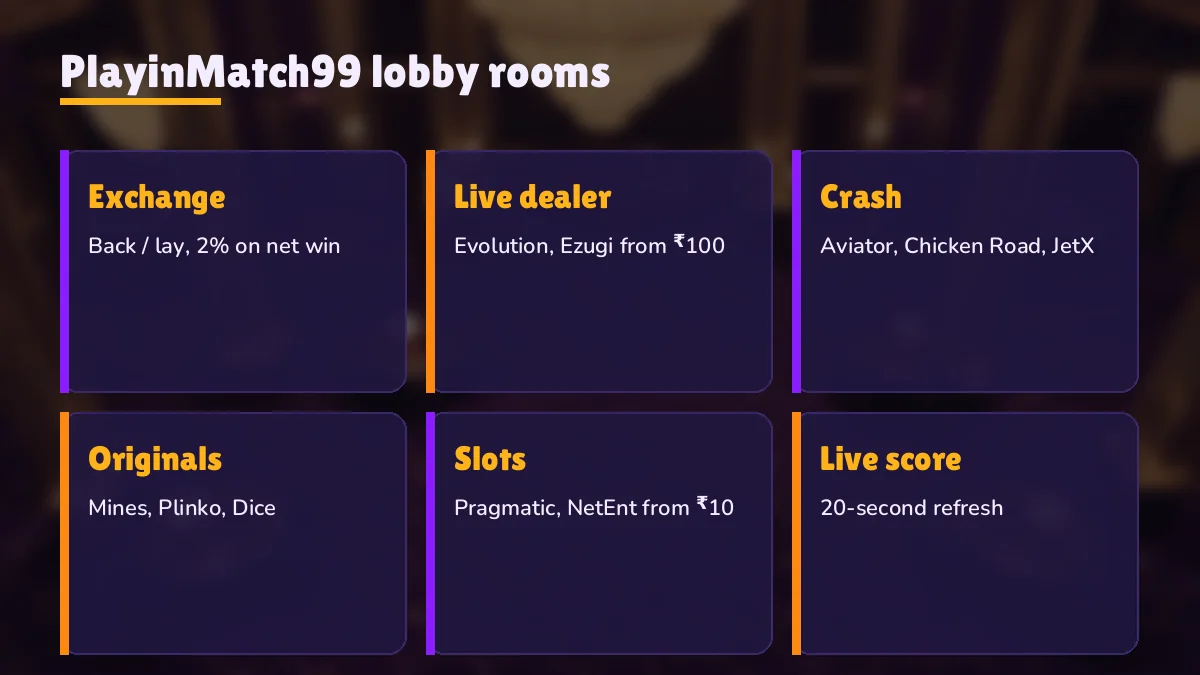
Think of the PlayinMatch99 lobby as a road with four lanes of games and one cricket market running alongside. Crash titles sit at the front because they are quick; a round can end within seconds of starting. Behind them come the instant originals, then the live dealer tables streamed from studios, then the slot reels. The cricket exchange threads through the lot, open during matches and quiet between them. Every row below draws on the same balance. That is the the part people tend to miss, so it bears repeating: one deposit covers all of it, and moving from a Teen Patti table to an Aviator round needs no transfer at all.
These rows are a preview. For the full catalogue, with providers and table limits, head to the PlayinMatch casino page; this home page only shows the shape of it.
PlayinMatch99 Crash Row — Fast Rounds With Chicken Road, Aviator and JetX



Crash games share one rule: the multiplier rises until something ends the round, and you decide when to leave. Chicken Road does it lane by lane, Aviator with a plane, JetX with a jet. PlayinMatch99 lists them side by side so the switch takes a single tap. Aviator has its own page with the auto cash-out details; the short version is that the PlayinMatch Aviator round allows two stakes at once, and any app selling a predictor for it is a scam.
PlayinMatch99 Originals Row — Quick Instant Games With Mines, Plinko and Dice

Originals are the shortest games in the PlayinMatch99 lobby. No dealer, no plane, just a grid or a ball or a roll. They suit the gap between two overs, roughly.
PlayinMatch99 Live Dealer Row — Real Tables From ₹100 and the Cricket Exchange

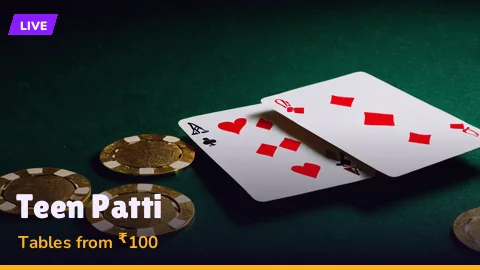
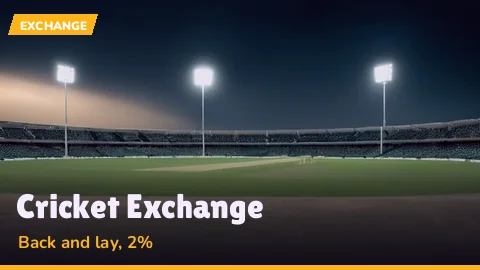
Live tables come from Evolution and Ezugi studios, with real dealers and a minimum around ₹100 a hand. At the end of the row, the cricket tile opens the PlayinMatch exchange, where you back or lay against other players and pay 2% only on net winnings in a market. Session and fancy markets sit there too.
PlayinMatch99 Slots Row — Top Pragmatic Reels From ₹10 a Spin



Slots on PlayinMatch99 start at ₹10 a spin and use the same login as everything else. Pragmatic and NetEnt supply most reels. For the longer list, open PlayinMatch com slots.
PlayinMatch99 Scores and Help Desk — Free Match Updates and 24x7 Support Beside the Lobby
Two things on PlayinMatch99 are not games but get used almost as often. First, the score strip. Cricket, football and tennis scores refresh every 20 seconds on the PlayinMatch live score today page, which is handy when an exchange market is open in another tab and you want the match state without a TV. Sports markets themselves sit under PlayinMatch online live sports.
Second, the desk. A PlayinMatch99 account is looked after by a WhatsApp desk that runs 24x7 and normally answers in around two minutes. It unblocks logins, resends OTPs, chases late payouts. Same number for everything, which is simpler than it sounds; the PlayinMatch customer care page lists what to send so the reply comes faster.
None of that needs a separate sign-up. Scores are open to anyone, and the desk talks to visitors before they hold an ID as readily as after.
PlayinMatch99 ID — Official WhatsApp Account Ready in About 5 Minutes
There is no sign-up form on PlayinMatch99. It starts as a chat. You message the ID desk on WhatsApp, say you want a PlayinMatch99 ID, and a username and password come back, usually within about five minutes. That pair works on the website, the mobile web address and the Android app alike.
Send a first message from whichever ID button suits you and answer the few questions that follow. Our join PlayinMatch steps list them and explain why each one is asked.
Copy the username and password into your notes the moment they arrive, before the chat scrolls away under other messages.
Test the new login at once in the card near the top, keeping WhatsApp open in another tab, so a wrong character gets fixed by the desk without a fresh request. OTP and lockout trouble is covered on the PlayinMatch login page.
Five minutes is the normal wait, not a promise. On a big match night the chat queue gets longer, and an ID can take a bit more. Three wrong passwords in a row lock the login for 15 minutes, which catches more people then you would think; the login page covers OTP and lockouts in full.
Why WhatsApp and not a form? Mostly because the same chat then handles deposits, payout questions and password resets for that PlayinMatch99 ID. One thread, from day one.
PlayinMatch99 Deposits and Payouts — Fast ₹500 UPI Start, IMPS Out
Money in: ₹500 by UPI
The smallest deposit PlayinMatch99 accepts is ₹500, paid by UPI. It normally shows in the wallet within two or three minutes. A separate PlayinMatch online deposit page walks through the UPI screen and what to do if the credit is late.
Money out: IMPS to your bank
Withdrawals leave by IMPS, from ₹1,000 upward. Expect roughly 20 to 40 minutes, inside a 10:00 to 02:00 desk window, with up to three payouts a day. Cut-offs and delays are on the PlayinMatch withdrawal time page.
Put together, a first evening on PlayinMatch99 looks something like this. Chat for the ID, five minutes. Send ₹500 by UPI, another two or three. Play the crash row or an over on the exchange. Ask for a payout once the balance passes ₹1,000, and the IMPS credit usually follows inside the hour. Rough timings, all of them, and they stretch when the desk is busy.
Is PlayinMatch99 Safe — Verified Basics Before the First Deposit
Three facts answer most of the worry. PlayinMatch99 pages load over SSL. The Android app asks for storage access and nothing beyond it. KYC documents are requested only when a payout goes above ₹1,00,000, so a normal PlayinMatch99 player is never asked for an Aadhaar photo to withdraw ₹2,000. For the full checklist, see is PlayinMatch safe.
Over 18 only. Online play is not legal in every Indian state, so check yours before you fund a PlayinMatch99 wallet, and pick a weekly cap you would be fine losing.
PlayinMatch99 App vs Browser — One Secure Login on Every Mirror
You can play PlayinMatch99 three ways and they all share one account. Android users get an APK of about 22 MB that runs on Android 8 or newer; it is not on the Play Store, so it comes from the PlayinMatch app download page. The mobile web address skips installing entirely and can sit on your home screen like an app. A laptop browser works too, and that is where the exchange ladder is easiest to read.
Which one? On an iPhone, the browser, since the APK is Android-only. On a cheap Android with little storage, probably the browser as well. On a recent Android you use daily, the APK saves a few taps. Add-to-home-screen steps are on the PlayinMatch com mobile page.
PlayinMatch99 Com, PlayinMatch 99 and Mirrors — Same Trusted Account Everywhere
People type the name a dozen ways. playinmatch99, playinmatch 99 with a space, playinmatch99 com with the extension spelled out. Search engines treat them as one brand and so does the account: PlayinMatch99 is a single wallet whatever address you reach it through.
Lost the link in the middle of a match? It happens. Providers in India cut off betting domains now and then, and PlayinMatch99 answers each cut with a mirror that carries over the username, the password and every rupee in the wallet. One WhatsApp line to the desk gets the working address back. That beats trusting a search result, since copycats register near-identical names to catch exactly that moment.
PlayinMatch99 Related Searches — Quick Links to Each Official Page
- playinmatch99 login
- playinmatch 99 id kaise banaye
- playinmatch99 com mobile
- playinmatch99 app download
- playinmatch99 aviator
- chicken road demo game
- playinmatch casino live
- playinmatch99 withdrawal time
- playinmatch customer care number
- playinmatch live score today
- playinmatch cricket exchange
- playinmatch com mobile login
PlayinMatch99 and PlayinMatch 99 Searches — Verified Answers Held on This Home Page
Where each playinmatch99 search lands on this page
Anyone searching playinmatch99 probably wants an account, or wants to check the brand before paying. ID desk, ₹500 UPI start, free Chicken Road demo: all of it sits above, so this band just maps each phrasing to its answer.
| What gets typed | What it means here |
|---|---|
| playinmatch99 | The brand itself; this home page and its lobby |
| playinmatch 99 | Same brand with a space; same ID, same wallet |
| playinmatch99 com | The address form; mirrors carry the same account when one is blocked |
| chicken road demo | The free board near the top, 1,000 demo coins, four difficulties |
Mirror and spelling notes for the PlayinMatch99 wallet
Spellings differ, accounts do not. A PlayinMatch99 username created today works on every mirror the brand runs, so nobody needs a second ID because a domain changed.
- Blocked address: ask the WhatsApp desk for the live mirror, then sign in with the same password.
- New player: chat for an ID, then load ₹500 by UPI to open the paid lobby.
- Just curious: the Chicken Road demo needs no sign-in and resets to 1,000 coins on request.
Anything deeper, such as payouts, app installs or the exchange commission, belongs to its own page, linked from the chips just above.
PlayinMatch99 Questions — Clear Answers on ID, Demo, Deposit and App
How do I get a PlayinMatch99 ID?
There is no sign-up form; a PlayinMatch99 ID is issued inside a WhatsApp chat with the desk. Reply to a couple of questions and a username plus password usually land within five minutes. Meanwhile the free Chicken Road demo on this page keeps running, and the login card at the top takes the new details.
Is PlayinMatch99 real or fake?
PlayinMatch99 is a working cricket exchange and casino wallet, not a placeholder site. Pages run over SSL, the app asks only for storage access, and KYC is requested only for payouts above ₹1,00,000. The is PlayinMatch safe page lists every check, so you can verify each point before you deposit anything.
What is Chicken Road on PlayinMatch99?
Chicken Road is a crash game from InOut Games with a 98% return, where a chicken crosses lanes and the multiplier grows with each one. You cash out before a car hits. PlayinMatch99 hosts a free demo of it on this home page with 1,000 coins and four difficulty settings.
What is the minimum deposit on PlayinMatch99?
PlayinMatch99 accepts deposits from ₹500 upward through UPI. Money tends to appear two or three minutes after you pay, and that single balance is what every crash round, live table, slot and exchange bet draws from. Paid but nothing showing yet? Send the WhatsApp desk your UPI reference number.
Are playinmatch99 com and playinmatch 99 the same site?
Yes, both spellings point to the same PlayinMatch99 brand and the same account. When Indian internet providers block a domain, a mirror address takes over with your existing username, password and balance unchanged. Ask the WhatsApp desk for the current mirror rather than trusting a lookalike link found in search.
Does PlayinMatch99 have an app?
PlayinMatch99 has an Android APK of about 22 MB for Android 8 and newer, downloaded from the brand rather than the Play Store. iPhone users and anyone short on storage can use the mobile web address instead and add it to the home screen. The login is identical on both.