
- PlayinMatch99
- PlayinMatch App
PlayinMatch App — Fast Android Lobby With a 20-Second Odds Pulse
The PlayinMatch app is a roughly 22 MB Android build that opens into one lobby: exchange markets, live dealer tables, Aviator, Chicken Road and slots. Prices on the odds board refresh every 20 seconds. You sign in with the same ID the WhatsApp desk issues for the website, so nothing about your account changes when you switch to the phone.
PlayinMatch App Feature Frame — A Clear Map of the Lobby Screen
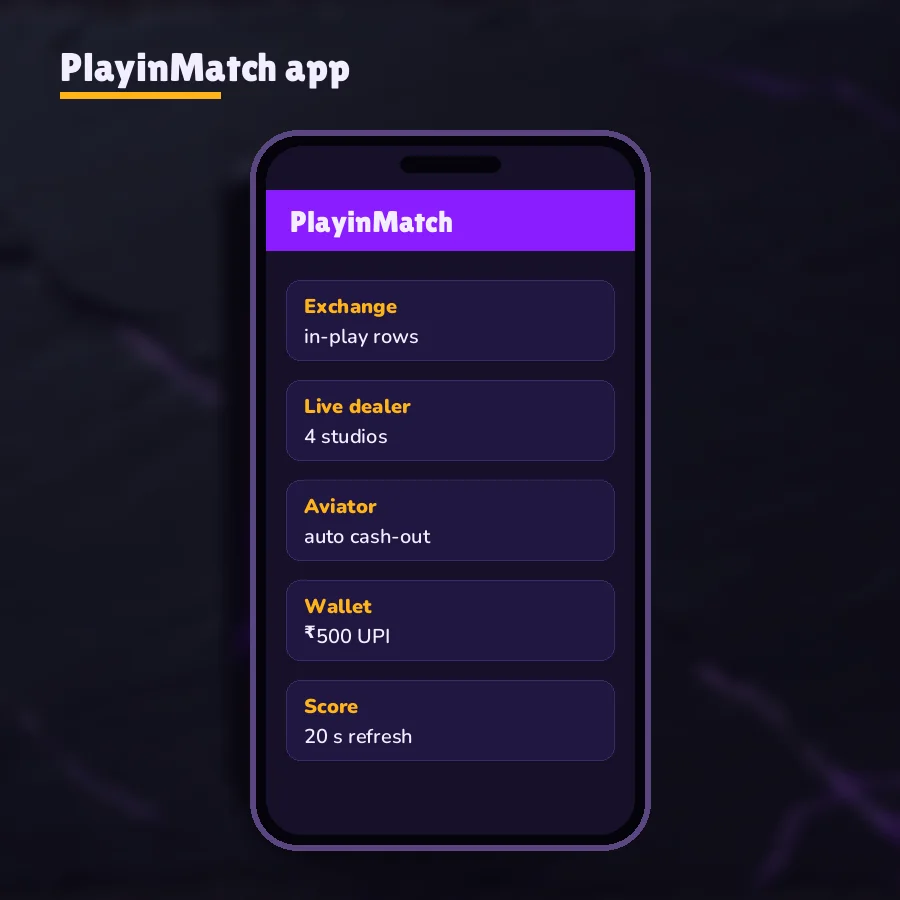
Before anything about speed or data, it helps to know where things sit. The frame below is a simplified map of the PlayinMatch app, not a screenshot. Five areas matter, and every one of them is reachable from the lobby in a tap or two.
- Wallet strip at the top. Your PlayinMatch balance stays visible from every lobby row. A ₹500 UPI deposit usually shows within 2-3 minutes; the full deposit flow lives on the PlayinMatch online wallet page.
- Odds board. Cricket, football and tennis prices, pulled again every 20 seconds. More on that cycle in the next section.
- Lobby rows. Exchange markets, live dealer tables, crash rounds and slot reels, all on the one PlayinMatch ID. The PlayinMatch game lobby lists what sits inside each row.
- Bets and history. Open bets, settled bets and your money movements, the same records you see on desktop.
- Help. A route to the 24x7 WhatsApp desk for login trouble, OTP resets and payout questions.
The frame shows layout only. Labels inside the real PlayinMatch app can differ slightly from build to build.
Pairing a PlayinMatch ID with the app — first launch, start to finish
The app does not create accounts. That catches people out more than anything else on this page. You need the ID first, then the install, then the sign-in, in that order.
Step one, the ID. The PlayinMatch app has no register screen, so the account comes from WhatsApp: send a message, and a username plus password usually arrive within five minutes. What the desk asks for is on the join PlayinMatch page. Copy both into your notes app, since chats get cleared.
Step two, the install. Download the APK, allow the install once, and let it finish. Nothing else to set up at this point.
Step three, the sign-in. Type the username exactly as sent, letters and digits with no spaces, then the password. If you switched on the optional 6-digit OTP, the app asks for it next. Mistype the password three times and the account sits locked for 15 minutes, so slow down on the second attempt rather then the fourth.
Step four, money in. The smallest UPI deposit is ₹500 and it normally lands in the wallet strip within 2-3 minutes. Withdrawals go out by IMPS, usually 20-40 minutes, from ₹1,000 upward; the PlayinMatch withdrawal time page has the desk hours and the daily limit on payouts.
From then on, the PlayinMatch app opens straight to the lobby each time. If you later sign in on the website or a second phone, it is the same account and the same balance, with no extra pairing step. Changing phones works the same way: install on the new one, sign in, done. Your bets and history were never stored on the old handset in the first place.
PlayinMatch App Lobby and the 20-Second Odds Pulse — Fast, Live Numbers
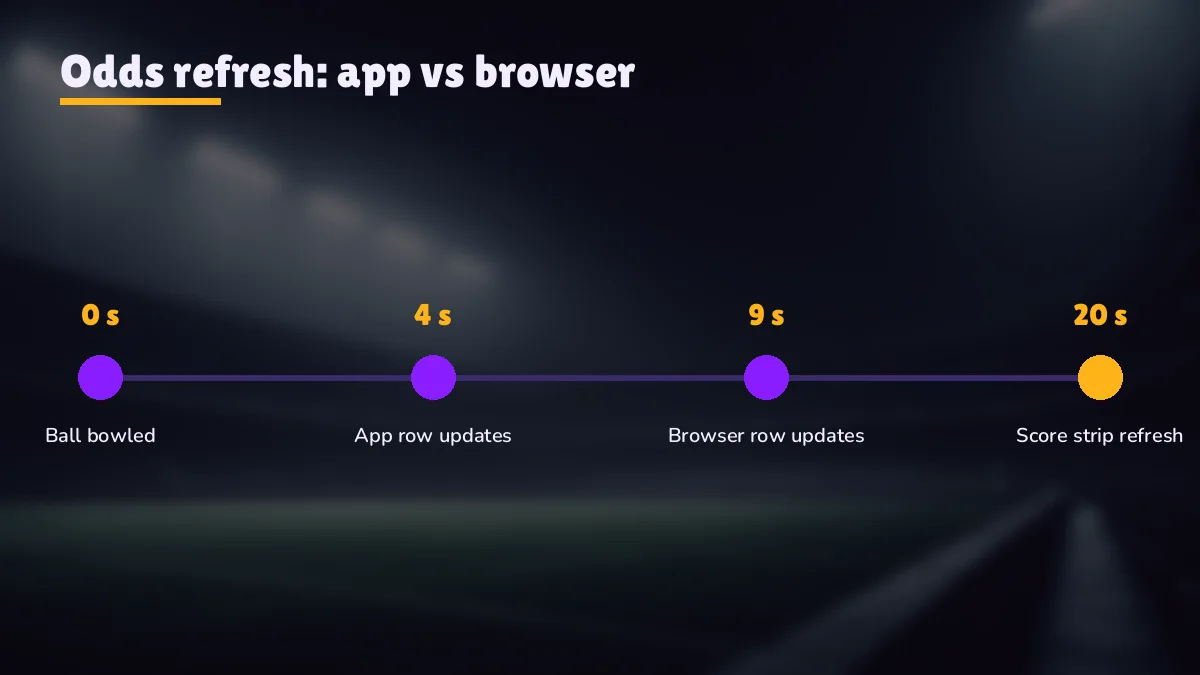
Every 20 seconds, the PlayinMatch app asks for a fresh set of prices and redraws the board. That is the pulse. Between two pulses the numbers on your screen hold still, even if something has already happened at the the ground, and that gap is the single most useful thing to understand about betting from the PlayinMatch app.
Put it in plain timing. Say a boundary is hit three seconds after a pulse lands. The market reacts at once, but your board only catches up at the next pulse, seventeen seconds later. Had the boundary come at second 19, you would see it almost immediately. On average you are looking at prices that are about ten seconds old, sometimes fresher, never older than twenty.
Is that slow? Depends what you compare it with. A television broadcast is usually behind the ground anyway, and a refreshing web page is often worse because nobody refreshes it on a fixed beat. The pulse is predictable, which is the point. You know the age of what you are looking at.
Second 0. New prices land on the PlayinMatch odds board for every market you have open. Back and lay columns both update together.
Seconds 1-19. The board holds. You can tap a price, set a stake and review the bet slip, but the figure is ageing while you do it.
Mid-cycle event. A wicket or a goal changes the real market. Your screen will not show the shift until the next pulse.
Second 20. The next set arrives and the cycle starts again. If your slip was built on the older figure, check it against the new one before you confirm.
So, in practice: for a small stake on a quiet over, the pulse barely matters. For a bigger stake in a final over, wait one cycle, let the board refresh, and then decide. Twenty seconds is not much to give up.
The same 20-second beat drives the score strip, which you can also follow without an account on the 20-second PlayinMatch score strip. Sports covered are cricket, football and tennis. (No kabaddi on it yet, going by the current list.)
Lobby speed, measured in taps. Speed in the PlayinMatch app mostly means fewer steps. The lobby rows sit on the first screen, so a cricket market, a dealer table or a round of Aviator is a tap or two away, with no browser bar and no address to retype after a domain block. That is the whole advantage, really. The prices themselves arrive on the same 20-second beat wherever you open them.
The exchange itself works the way it does on desktop: back a side, lay a side, see matched and unmatched amounts on the bet slip. Commission and market types belong to the PlayinMatch exchange page, so they are not repeated here.
PlayinMatch App Data Use and Battery — Real Costs of a Match Session
People ask for a megabyte figure per match. There isn't an honest single number, because the PlayinMatch app uses very different amounts depending on which lobby row you sit in.
The odds board is the light part. Each 20-second pulse carries numbers, team names and market labels, which is text, and text is small. Live dealer tables are the heavy part: they carry video from the studio, and video costs far more data than any odds list. Crash rounds such as Aviator and Chicken Road probably sit somewhere between the two, since most of what moves on screen is drawn on the phone itself.
| What you open in the PlayinMatch app | What travels over your connection | Relative data cost |
|---|---|---|
| Cricket or football odds board | Price updates every 20 seconds | Low |
| Score strip | Short score lines on the same 20-second beat | Low |
| Aviator or Chicken Road round | Round results and multipliers; graphics drawn on the phone | Low to medium |
| Slot reels | Spin results plus game graphics on first load | Medium |
| Live dealer table (Evolution, Ezugi) | Continuous studio video | High |
A long evening on one IPL market costs less than twenty minutes at a roulette wheel. That's the rough shape of it.
Battery follows the same pattern. The PlayinMatch app does not ask for location, contacts or camera access (it only needs storage to install), so nothing runs in the background tracking you. What drains a phone during a match is the screen staying on and, at dealer tables, the video decoding. If you are on a long innings with a low battery, the odds board on it's own is the gentle option.
One more thing on mobile data. When a connection drops for a few seconds, the board simply misses a pulse and picks up the next one. You do not lose bets you have already placed; those sit on the account, not on the handset. A slip you were still building may need re-checking against the new price once the PlayinMatch board reconnects.
PlayinMatch App vs Com Mobile — Same Trusted ID, Two Doors
Android app or mobile browser: PlayinMatch works through either, on one ID, one password and one wallet. The browser route needs no install and can be pinned to the home screen as an icon; that whole setup belongs to the PlayinMatch com mobile page. What follows is only how to choose between them.
Pick the PlayinMatch app if…
You use Android 8 or newer, you open the lobby most days, and you want sign-in to stick between sessions. The app keeps the odds board on its 20-second beat without a browser in the way, and it takes about 22 MB of storage.
Pick com mobile if…
Your phone is an iPhone, an older Android, or short on space. The APK is an Android file, so iPhone users go through the browser address instead. Same markets, same balance, no download.
Switching between the two in the middle of a match is normal. Say the phone drops to 8% battery in the 17th over: put it on charge, open the browser on a laptop, sign in with the same PlayinMatch username, and the open bet is sitting there waiting. One account, two doors into it.
One catch. Three wrong passwords in a row lock the PlayinMatch account for 15 minutes, and switching from app to browser is not a way round it. The PlayinMatch login page explains the OTP and reset steps.
PlayinMatch Live APK — Same Official File Under a Second Name
Type playinmatch live apk into a search bar and you end up here for a reason: there is only one Android build, and live is a nickname. Whatever the installer was called where you found it, it opens the same lobby with the same 20-second pulse and asks for the same PlayinMatch username. Players likely added the word because the app gets opened mostly while an over is being bowled.
If a Telegram channel or a forwarded link pushes a PlayinMatch live APK with extra features, such as an odds predictor, a guaranteed signal, or a VIP build, it is not ours. Predictor apps in particular are a known scam; the PlayinMatch Aviator page says why. Get the file only from the download page or from the WhatsApp desk.
The other source of confusion is the address. Betting domains are regularly blocked by Indian internet providers, so a link that worked last month can stop opening. That is a block on the address, not a problem with the file or your account. The desk shares a working mirror, and your ID and balance are identical on every mirror address. Same for the app: whichever mirror you downloaded from, the build is the same.
There is also a page for people searching the other spelling, PlayinMatch live app, which focuses on following matches from the phone. If you landed on this page looking for that, you are in roughly the right place either way.
Quick check that you have the genuine PlayinMatch live APK: the installer is around 22 MB and asks only for storage. If a file wants contacts, SMS or accessibility access, that is reason enough to delete it then and there.
PlayinMatch App Update Cycle — Latest Build Without Losing Your Balance
Version dates, not version numbers, are how PlayinMatch app builds are told apart. Each file on the PlayinMatch app download page carries a date stamp, and an installed copy never fetches a newer one by itself, since there is no Play Store listing behind it. Manual, then. A couple of minutes, start to finish.
Compare the date. Note the date stamp of the build you installed last time. If the download page lists a later one, there is an update waiting.
Download over the top. Fetch the new APK and install it over the old app. Android normally keeps the existing icon and replaces what is inside.
Sign in if asked. Use the same username and password. Your balance, open bets and history are stored on the account, so they appear exactly as before.
Remove stray copies. If you ever installed a second copy from somewhere else, uninstall it so you are not signing into an old build by mistake.
Should you update the moment a build appears? Not always necessary. If the current one works, the newer one can wait until after the match you are watching. Where it does matter is when the lobby starts showing errors that the older build cannot handle, which is usually the first sign that an update is overdue.
PlayinMatch app troubleshooting — quick fixes before you message the desk
Install blocked. A warning screen on first install is how Android treats any file from outside its own store; it does not mean the PlayinMatch build is faulty. Give the browser or file manager permission once. Phone makers tuck that switch into different menus, and the PlayinMatch install page covers it step by step.
App will not open on an old phone. The build needs Android 8 or newer. On Android 7 and below it will not run, and no setting fixes that. Use the com mobile address instead.
Odds look frozen. If the board has not changed for well over 20 seconds, the connection has dropped, not the market. Leave the market, go back to the lobby, and open it again once your signal returns.
Sign-in refused. Check the username for letters and digits only, no spaces. After three wrong passwords, wait out the 15-minute lock rather than trying a fourth time, because that just restarts the wait.
Still stuck. Send the PlayinMatch desk a WhatsApp message with your username and a screenshot of the error. Replies come in about two minutes, any hour of the day. OTP resets and the current build date are both things they sort out on chat; contact options sit on the PlayinMatch customer care page.
The PlayinMatch app is for adults 18 and over, and only where online play is legal in your state. Because the app makes it easy to open a market from anywhere, set a weekly cap on deposits before the season starts and keep to it.
Top PlayinMatch App Searches — Quick Links
PlayinMatch App Ledger — Verified Terms Used on This Android Page
Most searches that land here are some form of playinmatch app: the playinmatch app on Android, the playinmatch live apk, or the playinmatch app download apk. They all point at one build, the same PlayinMatch login, and one balance.
| Search phrase | What it means on this page |
|---|---|
| playinmatch app | The Android lobby with the 20-second odds pulse |
| playinmatch live apk | Same file as the app, a second search name |
| playinmatch app download | Fetching the APK with its version date stamp |
| playinmatch com mobile | The no-install browser door, same ID |
How the PlayinMatch app pulse is timed on this page
The board refreshes every 20 seconds, so a price is never older than that and is about ten seconds old on average.
- Android 8 or newer, around 22 MB installed
- Storage is the only permission the installer asks for
- Cricket, football and tennis on the same pulse
- Get an ID from the WhatsApp desk
- Install the PlayinMatch app
- Sign in and open the odds board
PlayinMatch App Questions — Quick, Clear Answers
What does the PlayinMatch app do once it is installed?
It puts the PlayinMatch exchange, live dealer tables, crash games and slots behind one Android icon, signed in with the same ID you use on the website. Odds on the board refresh every 20 seconds, and deposits, withdrawals and bet history sit in the same wallet section of the lobby.
How often do odds refresh in the PlayinMatch app?
Every 20 seconds. The board pulls a new set of prices on that cycle, so a figure on screen can be up to 20 seconds old when you tap it, and about ten seconds old on average. Before a large stake, wait for the next refresh so you are looking at the newest price.
Is the PlayinMatch live APK a different app?
No. The PlayinMatch live APK is the same Android file as the PlayinMatch app, searched under another name. It installs the same lobby, takes the same username and password, and shows the same balance. A link offering a special live build with extra features is unofficial, so check with the WhatsApp desk first.
How much data does the PlayinMatch app use during a match?
There is no single figure, because it depends on what you open. The odds board sends small text updates every 20 seconds, which is light. Live dealer tables carry studio video and use far more. An evening on one cricket market costs much less data than a short session at a roulette table.
Does the PlayinMatch app send notifications?
Notification access is your choice, set in Android settings for the app like any other install. The PlayinMatch app does not need it to place bets or move money. Account messages that matter, such as a new ID, a password reset or payout help, come through the 24x7 WhatsApp desk instead.
How do I update the PlayinMatch app?
Install the newer APK straight over the current one. First compare date stamps: the build on the app download page should carry a later date than the one on your phone. Account data is held under your PlayinMatch ID, not on the handset, so balance, open bets and history come through unchanged.