
- PlayinMatch99
- PlayinMatch Live Score Today
PlayinMatch Live Score Today — Real Ball Feed With Session Run Totals
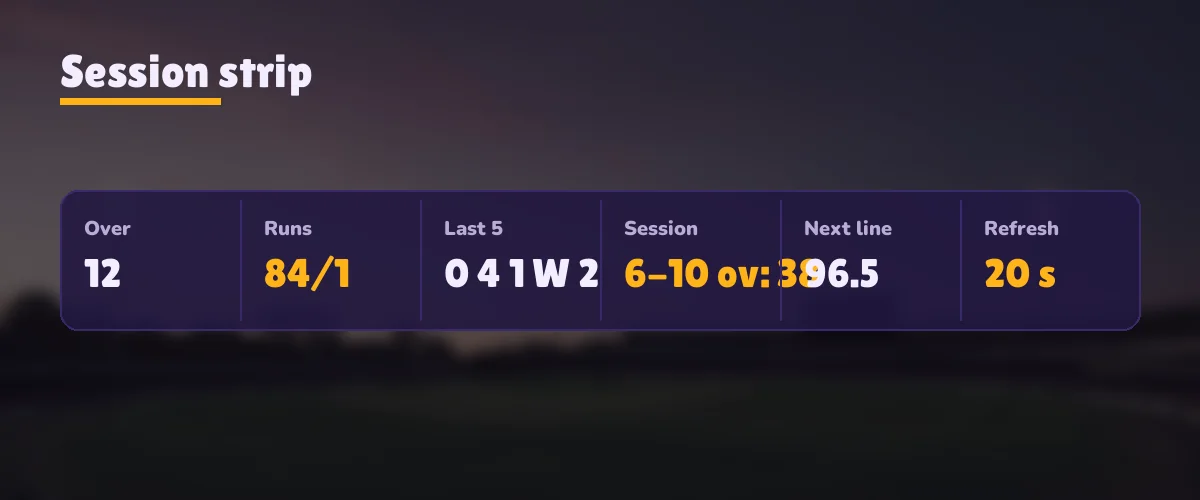
PlayinMatch live score today sits as a thin strip above each market: the latest ball, runs and wickets, the overs bowled, and the session tally that fancy lines are priced on. It pulls fresh data every 20 seconds. So the number you read is the number the odds were set against, give or take a delivery.

PlayinMatch Fixture Board Today — Live Matches Listed With Their Scores
Today's matches load into the board below as soon as your browser runs the page script. One row per fixture: the two sides, either the current score or the start time, and a link into that match's PlayinMatch market.
Fixture rows fill in here when the score feed answers. Still blank after a reload? Scripts may be blocked on this browser.
Nobody types these rows in. That is the whole point of the board, and also why PlayinMatch leaves it empty rather than showing a stale list when the feed is quiet. Want the full menu of sports and markets instead of just today's slate? The PlayinMatch online live sports page goes through it sport by sport.
PlayinMatch Live Score Today — Reading the Real Strip From Last Ball to Fancy Line
Open any cricket market on PlayinMatch and the strip loads first, above the back and lay columns. It is short on purpose. Four pieces of information, read left to right, and once you know the order it takes about as long to read as a glance at a phone clock.
The latest ball. One mark for the newest delivery: a dot, a run count, a four, a six, a W for a wicket, or the extra (wide, no-ball, bye). A short trail of the balls before it sits behind, so an over that has gone dot, dot, single reads as quiet without you counting anything.
Runs, wickets, overs. Second slot: the innings so far. A drop in wickets-in-hand here is what sends the PlayinMatch match odds furthest, much further than a boundary does, so when prices lurch, look at this slot before anything else on the strip.
The session total. Runs scored inside the current session window only, counted from the first ball of that window. More on this below, because it is the number that decides fancy lines and the one most people misread.
The next fancy line. Whichever session line PlayinMatch has open next, so you can see what the batting side is being asked to reach and how far off they are, without leaving the strip.
What the strip is not: a video, a commentary feed, or a wagon wheel. It is a scoreboard. If you watch the match on television at the same time, the picture and the strip will not line up perfectly, and which one runs ahead depends on your stream more than on PlayinMatch (cable and phone streams lag by different amounts). Treat the strip as the reference for your bets, because that is what the market itself is reading.
Before the toss the strip shows the start time and nothing else. After the last ball it freezes on the final line. In between it is the most useful twenty pixels on the page, which sounds like an exaggeration until the first time a price moves and you want to know why.
PlayinMatch Session Run Totals — Clear Over-by-Over Tallies for Fancy Lines
A session line on PlayinMatch asks one question: how many runs will the batting side have at the end of a set block of overs? Common blocks are the first 6 overs, 10, 15 and 20, though the exact windows open on a given day depend on the match. The innings total cannot answer that question on its own once a session is under way. You need the runs scored inside the window, and that is the figure the session tally in the strip gives you.
Here is how the arithmetic goes, with made-up numbers so nobody mistakes them for a real game. Say the 6-over line is open at 48 and the strip reads 31 for the session after four overs. The side needs 18 from the last twelve balls to clear it. Two balls later the strip shows a boundary and a single, the tally becomes 36, and the requirement drops to 13 from ten. That is the entire calculation, done every 20 seconds as the strip updates.
Extras count. A wide that runs away for four adds five to the session tally on the PlayinMatch strip, just as it does to the innings total. Leave them out of your own count and you will think the line is further away then it really is.
Wickets are tracked per session too. Some fancy markets ask about a fall of wicket rather than runs, and for those the strip's wicket count, not the session runs, is the number to follow. The two are next to each other, which helps; most of the mistakes come from reading the innings total where the session tally was needed. Its easy to do when the session started mid-innings and both numbers are climbing at once.
The chase works the same way. At the innings break the strip holds the first innings total; when the second innings starts, the PlayinMatch session tally goes back to zero and the new windows count from the first over of the chase. The target appears in the innings line. The session tally ignores it, which is correct, because a session line is about runs in the window and has nothing to do with how many are needed to win.
Once a session window closes, its final tally stays visible until the market is settled, and the the strip starts counting the next window from zero. Prices on session and fancy lines are set by other players on the PlayinMatch exchange, where a 2% commission comes off net winnings; that page covers back and lay in full, so this one stays with the numbers that feed them.
PlayinMatch Score and Odds Together — Live Prices Read Next to the Ball
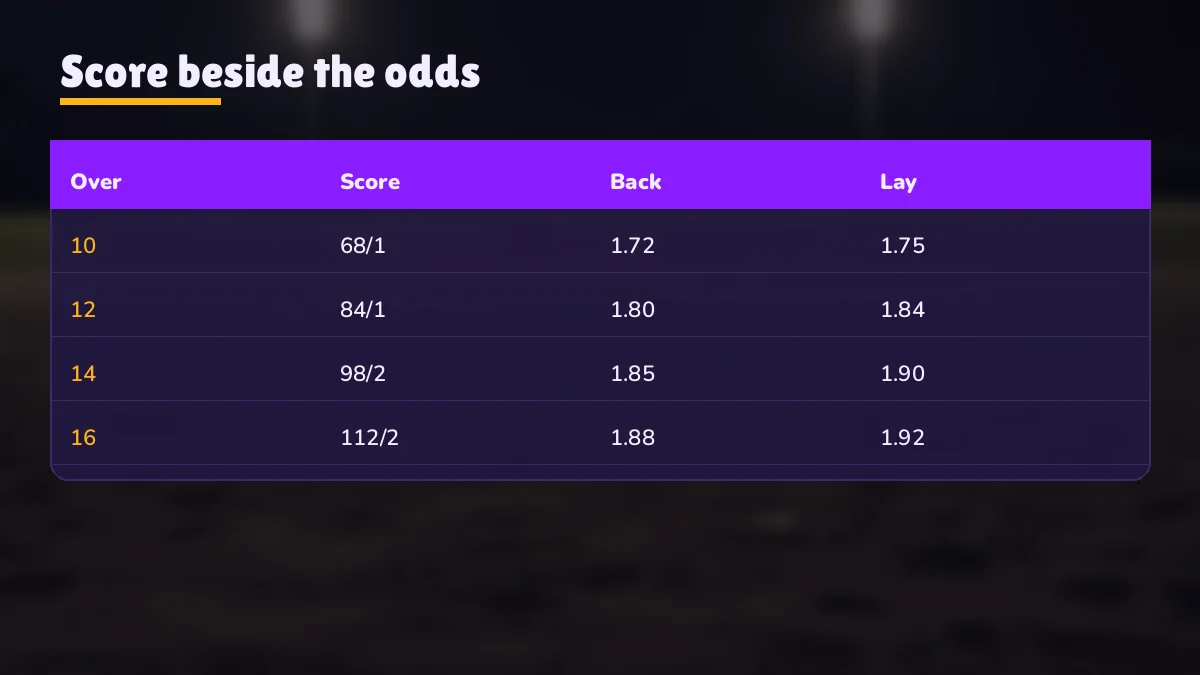
Why put a scoreboard on a betting screen at all? Because prices move on events, and an odds column without the event beside it is a set of numbers changing for no visible reason. On PlayinMatch the strip and the market share one view. A wicket shows in the strip, the match odds swing, and you can see cause and effect in the same place.
A big moment, say a wicket, a review, or a boundary late in a tight chase, usually puts the PlayinMatch market on hold for a few seconds, and the price cells read suspended. In practice the strip often catches up within one refresh, so if the prices are frozen and the score has not changed yet, the explanation is probably no more than 20 seconds away.
Suspended prices plus an unchanged strip: wait one refresh. The event behind the pause is usually the next ball to appear.
Prices moving sharply with no change in the strip: someone may be reacting to a broadcast that is ahead of the feed. Nothing is broken; the strip will catch up.
Strip moving, prices flat for a long time: the market may have closed for that session. Check the line label before placing anything.
PlayinMatch odds pause on a wicket — a worked timeline
Picture a delivery bowled at zero seconds that takes the off stump. The PlayinMatch match odds pause almost at once. Your strip last refreshed eight seconds before that ball, so for the next twelve seconds it still shows the old total and the old wicket count. At twelve seconds the refresh lands: the W appears, wickets go up by one, and the reason for the pause is on screen. The market then reopens at new prices. Anyone pricing a bet during those twelve seconds was pricing a wicket they could not yet see, which is the one gap the strip cannot close, and the reason to wait a refresh whenever prices show suspended.
None of this predicts anything. The strip says what has happened, not what will, and the people setting prices on the exchange can see the same numbers you can. What it does do is stop you backing a price that was set before a wicket fell. For the full list of PlayinMatch markets the score sits above, from match odds to sessions, see the PlayinMatch market list for each sport page.
PlayinMatch Result and Settled Bets — A Clear Record After the Last Ball
A PlayinMatch result shows in two places. The first is the strip of the finished market, which stops on the final line: the winning side and the margin, in runs or wickets, the way any scorecard writes it. The second is your bet history, where each slip on that match moves from open to settled once the market is closed out.
Those two do not happen at the same instant. The last ball ends the match; settlement follows once the result is confirmed. A short gap between the final score appearing and the slip changing status is normal, and it is not a sign that anything has gone wrong with the bet.
Settled slips show the stake, the outcome and the amount credited back to the wallet. From there the balance is yours to use on the next market or to withdraw; IMPS payouts and their timing are covered on the PlayinMatch withdrawal time page. A match cut short by rain, or a tie, is settled under the rules noted on that market (they differ between match odds and session lines, so read the note on the specific market, or ask the desk, rather than assuming).
To find a settled slip, open bet history from your PlayinMatch account and look for the match by name. Each slip lists the stake, the outcome and what came back to the wallet. A slip still marked open long after the final line has frozen is worth a message to the desk; send the match name and the time you placed it, and they can see exactly where it is.
Session lines settle earlier than the match. A 6-over line can be settled while the innings is still going, as soon as the sixth over is complete and the tally is confirmed. If you have a slip on a session and another on the match, expect to see the first settle well before the second.
PlayinMatch Football and Tennis Live Score — Real Goals, Cards and Set Counts
Cricket gets the most attention, but the same strip runs on PlayinMatch football and tennis markets. It looks different because the sports keep score differently.
Football on the strip
Goals for each side and the match clock. Bookings and sendings-off appear as the referee hands them out, which matters more than it sounds: a sending-off changes a match, and the odds react to it as sharply as they react to a goal. At half-time the clock stops and the strip says so.
Tennis on the strip
Sets won, games in the current set and, in most matches, the point score of the game being played. Tennis moves faster than the refresh: long rallies end quickly and short points even quicker, so expect the strip to jump a point or two at a time on a quick service game.
The refresh is the same 20 seconds across all three sports on PlayinMatch. For football that is plenty; not much happens in 20 seconds of most football matches. For tennis it is closer, and a service game can be half over between two updates. Keep that in mind on point-by-point markets.
When two PlayinMatch fixtures overlap, say an afternoon cricket match running into an evening football game, each market carries its own strip. The fixture board at the top of this page lists both, and opening either market brings its strip with it; there is no single combined ticker to scroll.
PlayinMatch Score Refresh — Reliable 20-Second Cadence and Fixes When It Stalls
Every 20 seconds the strip asks for new data and redraws. That cadence decides how fresh any number on it can be. A ball bowled one second after a refresh shows up roughly 19 seconds later; a ball bowled just before one shows almost at once. Averaged over an over, the strip runs about ten seconds behind the field.
Is that ball by ball? Yes, in the sense that every delivery appears. No, in the sense of each ball arriving the instant it is bowled. On a fast spell where balls come every 25 to 30 seconds, the strip will occasionally show two new balls in one jump. Most people never notice. If you are trading the next ball, you will.
PlayinMatch strip not updating — quick checks in order
Wait 40 seconds. Two missed refreshes in a row means something is actually wrong. One can just be a slow update during a review or a drinks break, when there is nothing new to show anyway.
Reload the page. The strip starts a fresh connection on load. This fixes most stalls, especially after a phone has been locked for a while and the browser has paused the tab.
Check you are still signed in. An expired session can leave an old strip on screen. If the market asks you to log in again, sign in and the feed comes back with it.
Try the mirror address. If the whole page, not only the strip, has stopped loading, your provider may have blocked that domain; Indian ISPs do this to betting sites now and then. Your username, wallet and score feed carry over to the mirror unchanged. Ask the desk on chat which mirror is current.
If none of that works, the 24x7 desk on the PlayinMatch customer care page can check whether the feed is down for everyone or only for you. In practice it is almost always the second, and almost always a reload.
The app is the same story. The PlayinMatch Android build and the mobile browser both read the same feed, at the same 20-second cadence, so switching from one to the other will not make the score any faster. The PlayinMatch live app page shows where the strip sits on a phone screen, and the APK itself, about 22 MB, comes from the PlayinMatch app download page. Scores are free to read. Staking on them is for adults 18 and over, only where your state allows it, and a limit chosen before the first ball holds up better than one chosen during a chase.
PlayinMatch Live Score Searches — Top Pages Players Open Next
- PlayinMatch online live sports
- PlayinMatch live app scores
- PlayinMatch exchange session lines
- PlayinMatch game lobby
- PlayinMatch login for the strip
- Join PlayinMatch on chat
- PlayinMatch app download APK
- PlayinMatch com mobile browser
- PlayinMatch withdrawal after a result
- PlayinMatch customer care 24x7
PlayinMatch Live Score Today and Result — Clear Ledger of Strip Terms
How the strip numbers map to what you search for
People look for the PlayinMatch live score today when a match is already on and they want the number beside the price, not a separate scoreboard tab. The PlayinMatch live score strip is that number: ball, total, session tally and next line, updated every 20 seconds over cricket, football and tennis.
| Strip field | Used for |
|---|---|
| Latest ball | Next-ball and over markets |
| Runs / wickets / overs | Match odds |
| Session tally | Session and fancy lines |
| Final line | PlayinMatch result and settlement |
A PlayinMatch result is read off the frozen strip once the last ball is bowled, then confirmed in bet history when the slip settles; session slips settle earlier than the match.
- Cricket live score
- Ball, runs for wickets, overs, session tally.
- Football live score
- Goals, the match clock, bookings and sendings-off.
- Tennis live score
- Set score first, games after it, and for most fixtures the point now being played; one update every 20 seconds, so a fast hold can skip past.
- Refresh
- Every 20 seconds, the same on app and browser.
The same login and wallet work on every mirror address, so a blocked domain changes the address in your browser bar and nothing about the scores.
PlayinMatch Live Score FAQ — Quick Answers on Ball Feed and Results
Does the PlayinMatch live score show every ball?
Yes, every delivery appears in the PlayinMatch strip, including wickets and extras. It is not instant, though. The feed refreshes every 20 seconds, so a ball can take up to that long to show, and on a quick spell two new balls may arrive in a single update.
How often does the PlayinMatch score refresh?
Every 20 seconds, whichever sport the market belongs to. A strip that sits unchanged through a drinks break or a third-umpire review is fine, because no ball has been bowled. Unchanged for two cycles while play is on means a stall; reloading the market page starts a new feed connection and usually clears it.
Where can I see the PlayinMatch result of a finished match?
The PlayinMatch result stays on the strip of the finished market, showing the winner and the margin. Your bet history then moves each slip on that match from open to settled once the market is closed out, with the amount credited back to your wallet. Session slips settle before the match does.
Can I check the PlayinMatch live score on the app?
Yes. The PlayinMatch Android app and the mobile browser read the same score feed on the same 20-second cycle, so the strip looks and behaves the same on both. You sign in with the same username, and the score appears above each market you open.