
- PlayinMatch99
- PlayinMatch Login
PlayinMatch Login — Secure Gate, Three Tries, Then a 15-Minute Hold You Can Lift
PlayinMatch login on a phone you have used before needs two things: the username the desk gave you and your password. A new phone adds a 6-digit code. Three misses in a row close the gate for 15 minutes, and a short chat can open it sooner.
PlayinMatch Login Replica — A Clear Look at the Three Error States
Nothing on this copy of the PlayinMatch login form is wired up. One reason it exists: so the three messages most people hit look familiar before they show up on the real gate. Word for word, the live PlayinMatch screen may phrase them a little differently from one mirror to the next (the meaning stays put).
State 1 · username not recognised
No account with that username
A space crept in between the letters and the digits. The PlayinMatch username is one unbroken string.
State 2 · password refused
Wrong password — 2 tries left
Username fine. Only the password is off, and this miss already counts toward the three.
State 3 · gate on hold
Too many attempts — try again in 15 minutes
Third miss. The PlayinMatch gate stops taking guesses until the clock runs out or the desk clears it.
Amber means the gate could not match the name. Red means the name matched and something after it failed. That split matters for what you fix next. Whether an amber miss also uses up one of your three PlayinMatch tries is something we cannot confirm, so the safe habit is to treat every refused attempt as a used one.
PlayinMatch Login Fields — Username, Password and the Quick 6-Digit OTP
Three boxes at most, and on most days, on a phone you already use for this account and have signed in on before without changing anything about it, you will only see the first two of them. Two.
Username. Letters and digits, nothing else, issued to you in the chat when the ID was made — if you do not have one yet, the join PlayinMatch desk chat sets it up in about five minutes. Copy it from that chat rather than typing it from memory. People mix up the letter O and the digit 0, or a lowercase l and the digit 1, far more often than they forget a password, and the PlayinMatch gate reads each of those as a completely different name.
Password. The one you received with the ID, or the one you set afterwards. Phone keyboards like to capitalise the first letter and add a space after a full stop; both quietly turn a correct PlayinMatch password into a wrong one. If your keyboard has a password mode, it switches those habits off. Most do it on their own once the field is marked as a password field, which the real form is.
The 6-digit code. Optional in the sense that it only appears when the account sees a phone it does not know. Six digits, typed straight in, no spaces. A fresh handset, a borrowed phone, a second SIM in a new device — those are the usual triggers. If a browser you cleared also asks for the code, treat it the same way. When the code simply does not arrive, the PlayinMatch customer care chat handles OTP trouble around the clock.
That is the whole PlayinMatch login. Username, password, and sometimes a code. No email address, no date of birth. That short list is partly why the three-try rule exists: with so few fields, the lock is what stops someone from guessing their way into an ID that is not theirs.
Second check, for when spaces are not the issue: read the digits of the username against the chat message one at a time. 4471 is not 4417, and swapped digits catch people more often than you would guess. Spot it before attempt two and you keep a PlayinMatch try in hand.
PlayinMatch Login Messages — Quick Reading of Every Refusal on the Gate
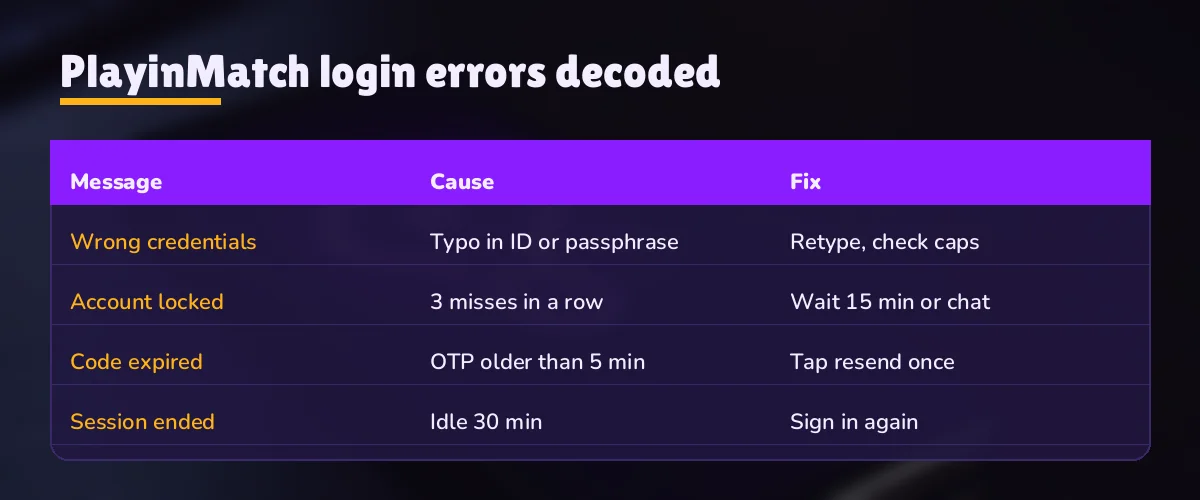
Every refusal on the PlayinMatch sign-in screen falls into one of a handful of groups. Read the left column below as a short form of what you see; exact wording can shift a little, so match on meaning rather than on letters.
| What the gate says, roughly | What it means | What to do next |
|---|---|---|
| No account with that username | The name you typed does not exist on the PlayinMatch side | Check for spaces, O versus 0, l versus 1; copy the name from the desk chat |
| Wrong password, tries left shown | Name matched, password did not; one of three tries used | Stop and check caps and autocorrect before the next attempt |
| Too many attempts, wait 15 minutes | Third miss; the gate is on hold | Wait the 15 minutes or ask the desk to lift it |
| Code incorrect or not accepted | The 6-digit OTP did not match what was issued | Ask for a fresh code; type all six digits with no spaces |
| Address will not load at all | The mirror is blocked by your internet provider, not your ID | Ask the desk for the working mirror; same ID, same balance |
That last row trips up more people than the other four put together. Indian internet providers block betting domains from time to time, and when that happens the PlayinMatch login page does not show an error at all. Blank page, spinning forever. Nothing is wrong with your username. Your ID and balance sit with the account, not with the address, so the same login works on whichever mirror is live that week.
PlayinMatch login worked example — fixing a real refusal in under two minutes
Say the gate answers with the amber no-account message at 10:05 at night. First move: open the chat where the ID arrived and long-press the username to copy it. Paste it into the PlayinMatch username box. If the amber message goes away and a red password message replaces it, good news, in a way — the name is now right and you have learned the password needs work too. That second miss counts. So before the third, switch the keyboard to its plain layout, type the password slowly, and look at the first character. Capital letter you did not mean? That was it. Should the third try fail as well, the 15-minute hold starts and the next section takes over.
Most refusals end at step one. Copy, paste, done. A smaller number need the password check. Very few, in practice, reach the hold.
PlayinMatch Login Lock — The 15-Minute Hold and the Fast Chat That Lifts It
Three wrong attempts in a row, and the PlayinMatch gate stops listening for 15 minutes. That is the rule. On the app and in a browser it works identically, because the hold belongs to the ID and not to the device you were typing on.
Try one fails. Two left. Nothing visible changes except the message.
Try two fails. One left. This is the moment to stop typing and check the username and the keyboard, because the next miss costs a quarter of an hour.
Try three fails. The PlayinMatch gate holds the ID for 15 minutes. A countdown or a wait message appears in place of the usual refusal.
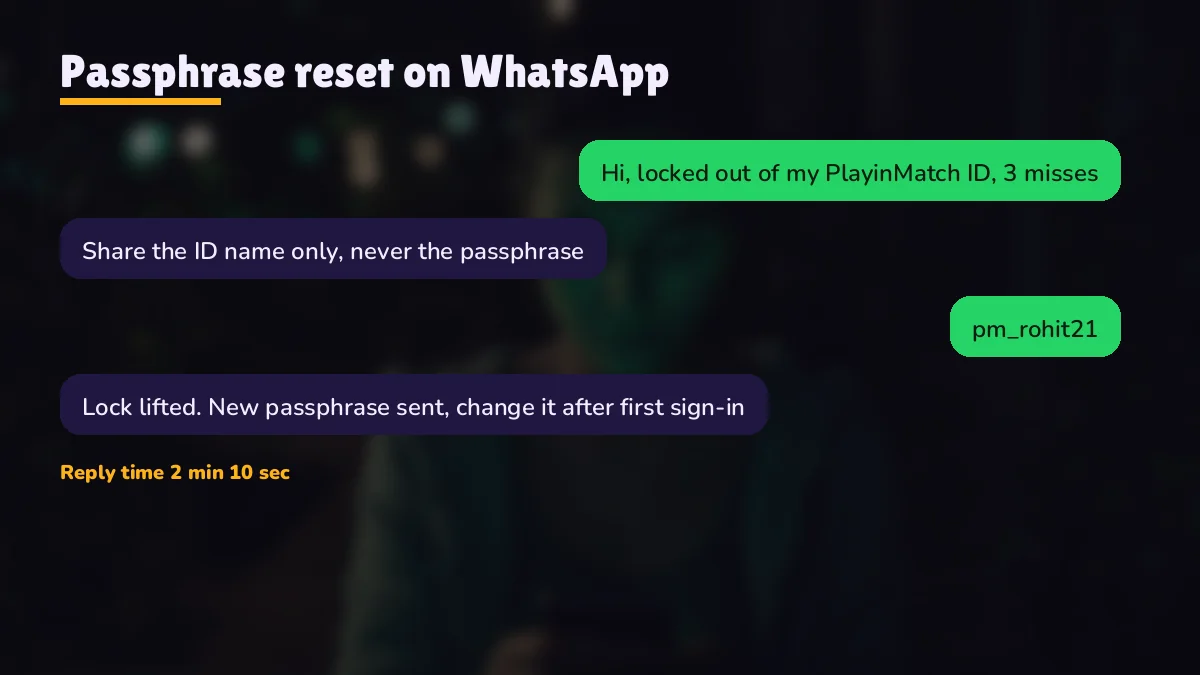
From there you have have two roads. Road one is to wait: lock at 9:40 pm, open again at 9:55 pm, and you get three fresh tries. Road two is faster. Message the PlayinMatch desk, which runs 24x7 and usually answers in around two minutes, say the ID is on hold and give the username. They can clear it, which turns a fifteen-minute wait into something closer to five.
One thing we cannot tell you for certain is whether more attempts during the hold restart the clock. Some sign-in systems do that; we have not seen it confirmed for PlayinMatch either way. It is not worth testing. Put the phone down, or open the chat.
Why does the hold exist at all? Because the PlayinMatch login has so few fields. With only a username and a password standing between a stranger and your balance, a cap on guesses is the cheapest protection there is. Fifteen minutes is long enough to make guessing pointless and short enough that a genuine user who fumbled a password loses a cup of tea, not an evening. Annoying, sure. That same cap is why someone who finds your username in an old screenshot cannot just keep trying.
A pattern worth recognising: if the hold keeps coming back on a PlayinMatch ID you have not touched, someone else may be typing at it. Tell the desk. A password change through the chat fixes that, and its the one case where waiting it out is the wrong call.
PlayinMatch Password Reset — Secure Recovery Through the 24x7 Desk Chat
Resetting a PlayinMatch password takes a person rather than a link. Whoever picks up the 24x7 chat confirms the ID is yours, and only then does anything change on the account. From your side it is four moves.
- Open the chat you used when the ID was created, or the 24x7 PlayinMatch support line if that thread is gone.
- Use the four-line message described a little further down, username first.
- Answer whatever the desk asks to confirm the ID belongs to you. Usually that is short.
- Paste the fresh password into the gate in the same sitting. Refused? Reply in that thread instead of opening a new one, so the history stays together.
A few minutes of chat, in most cases. Replies tend to land in about two, and the rest is you typing the new password correctly.
Locked and unsure of the password at the same time? Put both in one message. Sitting out the 15 minutes and then guessing again is how a second hold happens, usually with the same wrong password typed three more times.
PlayinMatch reset message — a quick four-line template for the desk
Most back-and-forth in a reset chat comes from a first message that says only "can't login". Send this instead, all in one go:
- Your PlayinMatch username, copied, not retyped.
- What the gate showed: no-account, wrong password, the 15-minute hold, or a missing 6-digit code.
- Whether you are on the app, a desktop browser or the phone browser.
- Whether this is a new phone for the ID.
Four lines. With those, the desk can tell straight away whether you need a hold lifted, a fresh password, a code, or simply the current mirror address, and the PlayinMatch login usually works on the next attempt. Without them, expect a couple of questions first. A screenshot of the error does the same job as the second line if typing it out feels slow; just crop out anything that is not the sign-in screen.
After a reset on a new phone, expect the 6-digit code as well. The PlayinMatch gate does not treat a new password as a reason to skip the device check, and it probaly should not.
PlayinMatch Login on App, Browser and Com Mobile — Same ID, Quick Switch
One username and one password open every door. The Android build, a desktop browser and the mobile web address all lead to the same PlayinMatch account, the same balance and the same bet history. What changes between them is mostly how passwords get saved, and that is where the trouble usually starts.
PlayinMatch app sign-in — quick once, then saved
The PlayinMatch app for Android asks for the username and password the first time and may keep you signed in after that. Being a new install on a new handset, the first sign-in is also the one most likely to ask for the 6-digit code. Reinstall the app and the full sign-in comes back. Nothing is lost; the PlayinMatch account lives on the server side, not on the phone.
PlayinMatch browser sign-in — watch the autofill
Desktop browsers remember the password per address. When the PlayinMatch mirror changes, the saved entry sits under the old address and the browser offers nothing, or worse, offers an old password you have since reset. Type it fresh on a new mirror. Then let the browser save it again for the new address.
The mobile web route has its own page: the PlayinMatch com mobile login covers signing in from a phone browser without installing anything, including how to pin the address to your home screen. Same username there too. After you are in, money questions belong elsewhere — payout timings are on the PlayinMatch withdrawal time page.
Can the same PlayinMatch ID be open on the app and a laptop at once? Hard to say for every case. The username itself works on both. If one device signs you out when the other signs in, that is a session matter rather than a wrong password, and it does not count toward your three tries.
PlayinMatch 365 Login — Same Trusted Sign-In Under Every Spelling
People reach this gate by a dozen spellings. PlayinMatch 365 login, playin match login, PlayinMatch99 login, the brand name with a typo in the middle. Same gate. Whatever went into the search bar, the form that comes up asks for the same two fields and accepts the same ID the desk issued.
The 365 spelling deserves a line of its own because it makes people think there is a separate PlayinMatch 365 account with its own password. There is not, as far as the ID desk goes. One ID, issued once, used everywhere — the gate does not care which spelling or which mirror address brought you to it. Whatever username you were given covers the 365 search too.
Mirrors, briefly: betting domains in India get blocked by internet providers now and then, so the PlayinMatch address you sign in on may change. ID and balance stay where they were. Same login, same money, new address.
A small warning that is really just common sense. Any page offering a PlayinMatch 365 login that asks for more than a username, password and maybe a 6-digit code — a card number, a UPI PIN, a selfie — is not this gate. The sign-in described on this page asks for three things at most, and none of them is money.
PlayinMatch Login Searches — Quick Links to Related Official Pages
- join PlayinMatch new ID
- PlayinMatch com mobile login
- PlayinMatch password reset chat
- PlayinMatch WhatsApp number
- PlayinMatch app download login
- PlayinMatch app sign in
- PlayinMatch com mobile
- PlayinMatch withdrawal time
- is PlayinMatch safe
- PlayinMatch online deposit
- PlayinMatch exchange login
- PlayinMatch live app
PlayinMatch Login Ledger — Verified Field Rules and Recovery Steps
This ledger gathers the PlayinMatch login facts from the page above into one place: the PlayinMatch99 login fields, what the gate does after misses, and how the 365 login search and the com mobile login route land at the same account.
What goes into each box of the sign-in card
- Username for the PlayinMatch login: letters and digits, copied from the issue chat
- Password: as issued or as reset through the desk
- 6-digit OTP: only when the phone is new to the PlayinMatch ID
Order of steps when the gate refuses you
- Copy the username again and check for spaces
- Check caps and autocorrect before the second try
- After the third miss, wait 15 minutes or ask the desk to lift the hold
Which search spelling leads to which sign-in
| PlayinMatch 365 login | Same gate, same ID |
|---|---|
| PlayinMatch99 login | Same gate, same ID |
| PlayinMatch com mobile login | Phone browser, same ID |
| PlayinMatch app login | Android build, same ID |
Both recovery cases on the PlayinMatch login, a lost password and a running hold, end in one desk thread, whether you arrived through the 365 login search or the com mobile login route.
PlayinMatch Login Doubts Cleared — Trusted Replies on Codes, Locks and Mirrors
How do I log in to PlayinMatch?
Open the PlayinMatch sign-in gate, type the username the desk sent you, then your password, and tap sign in. On a phone the account has not seen before, a 6-digit code is asked for as well. Three wrong tries in a row put the ID on a 15-minute hold.
What does a PlayinMatch username look like?
A PlayinMatch username is one unbroken string of letters and digits, issued in the chat when the ID is created. It has no spaces or symbols. Copy it from that chat instead of typing it from memory, because O and 0 or l and 1 look alike and the gate reads them as different names.
I forgot my PlayinMatch password. How do I reset it?
Message the 24x7 PlayinMatch desk with your username and ask for a password reset. After a short check that the ID is yours, the new password comes back in the same chat. Sign in with it straight away; on a new phone the 6-digit code will appear as well.
Why is my PlayinMatch login locked?
A 15-minute hold sits on the ID after the third wrong attempt in a row, and that is the only cause. The timer ends by itself and hands back three new tries, or a message to the PlayinMatch desk can end it earlier. A hold you did not trigger means someone else is typing at your username.
Why did I not get the PlayinMatch OTP?
If the 6-digit PlayinMatch code does not arrive, stop retrying the password, because the username and password were already accepted at that point. Message the 24x7 desk with your username and say the code is missing. OTP trouble is one of the things the desk sorts out from its side.
Can I use one PlayinMatch login on two devices?
Yes, the same PlayinMatch username and password work on the Android app, a desktop browser and the mobile web address. Each new phone may ask for the 6-digit code once. Whether both stay signed in at the same moment can vary; a sign-out on one device is a session matter, not a wrong password.
Is PlayinMatch 365 login different from the normal login?
No, the form and the account are identical. Typing PlayinMatch 365 into a search bar is one of several routes people take to this sign-in, and the username from your desk chat opens it. When a blocked domain moves the address to a mirror, your balance and ID travel with you.
Is it safe to log in to PlayinMatch on public Wi-Fi?
Mobile data is the safer choice, since open cafe or station Wi-Fi is shared with strangers. The PlayinMatch connection itself is encrypted, and the full picture is on the is PlayinMatch safe page. If anything looks off after signing in on a shared network, ask the desk to change your password.