
- PlayinMatch99
- PlayinMatch Com Mobile Login
PlayinMatch Com Mobile Login — Easy OTP Keypad With a 60-Second Code Window
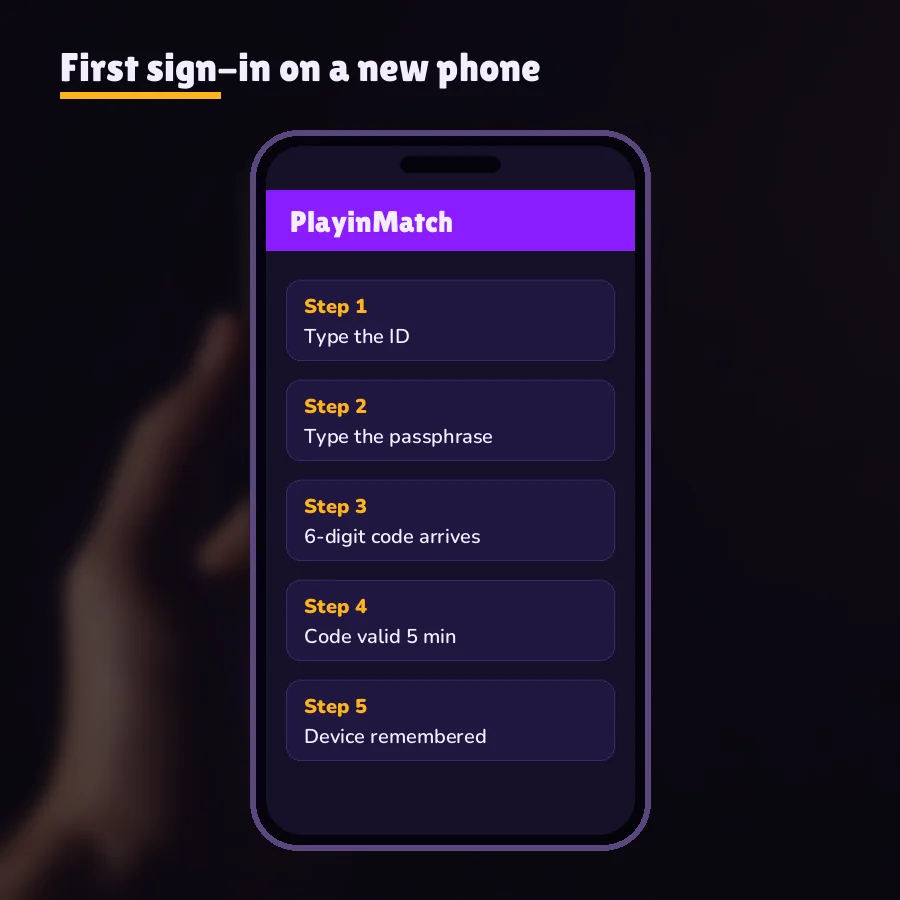
PlayinMatch com mobile login is three screens on a phone browser: the username, the password, and a 6-digit code typed on the keypad before 60 seconds run out. Almost every failed attempt we hear about happens on that third screen. So that is where most of this page lives.
PlayinMatch OTP Keypad — Fast 6-Digit Entry Inside One Clear Minute
Six boxes and a clock. That mock on the left is roughly what the PlayinMatch code screen asks of you once the password clears: a number keypad slides up, the boxes fill left to right, and the timer counts down from sixty. Nothing about it is clever. It just doesn't forgive a slow thumb.
Numbers only on that keypad, so there is no reason to switch keyboards or paste letters. If your phone offers to autofill the code from an incoming SMS, let it; that saves the five or six seconds people usually lose flicking between the messages app and the browser tab. On some Android builds the suggestion pops up just above the keys. On an iPhone it sits in the keyboard bar as "From Messages". Either way, one tap fills all six boxes for the PlayinMatch sign-in.
When the clock reaches zero the code is dead. Typing it after that does nothing useful, even if every digit is correct, and the PlayinMatch screen will want a fresh one. Ask for the new code, wait for it, and ignore the old SMS sitting in the inbox (people type the older one by mistake more often than you'd think).
Sixty seconds is the window, not the delivery time. Your PlayinMatch keypad clock starts when the code is sent. If the SMS takes 40 seconds to arrive, you have 20 left to type it. That is why a slow Jio or Airtel message hurts more than it seems to.
One code at a time. Treat each new request as replacing the last. Two SMS from PlayinMatch in the inbox means only the newer one counts, and the newer one is the one at the top.
OTP is optional per ID. Plenty of PlayinMatch accounts sign in with username and password alone. If yours never shows the keypad, nothing is broken; the code step simply isn't switched on for that ID.
PlayinMatch Com Mobile Login Screens — Clear Order From Username to Code
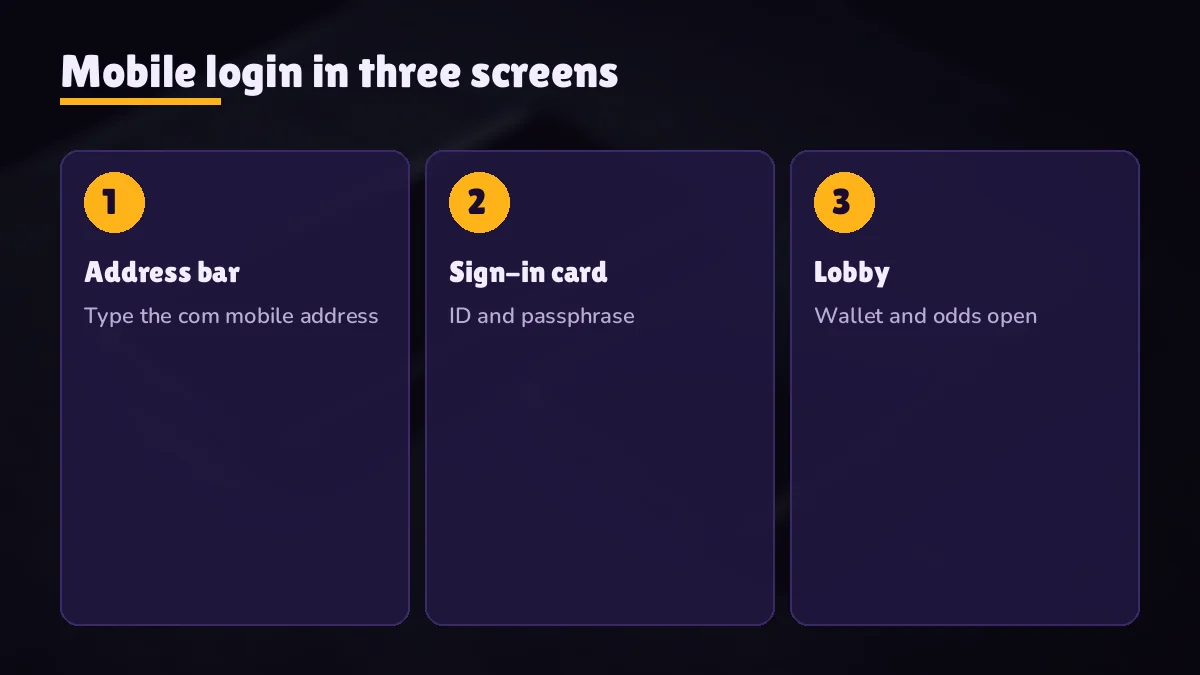
Open the PlayinMatch com mobile address in Chrome, Safari or whatever browser your phone already has. There is no install for this route. Finding the address is covered on the PlayinMatch com mobile mirror list, including how to pin it to the home screen so it opens like an app icon. Once the sign-in card is in front of you, the order never changes.
Username. First box on the card. A phone browser that remembers old form entries may fill it on its own; glance at the suggestion and make sure it is the PlayinMatch ID you mean to use today, not some test name from months back. Only letters and digits belong here.
Password. Saved it in Google Password Manager or iCloud Keychain the first time? Let that fill the box. It dodges typos and the keyboard's habit of capitalising your first letter, which on its own is enough to make a PlayinMatch password miss. Full rules for this step, including the three-tries lockout of 15 minutes, live on the main PlayinMatch login page.
Code. If OTP is on for the ID, the keypad appears and the clock starts. Type all six digits, then confirm. Next comes the lobby, with the same balance you see on any other PlayinMatch address or on the app.
That is the theory. In practice it is a bit messier, mostly because the three steps happen across two apps, the browser and the SMS inbox, and switching between them is where the seconds go.
A worked minute. 21:14:05: password accepted, keypad appears, code requested. 21:14:19, Airtel SMS lands (14 seconds). 21:14:22, the autofill suggestion is tapped, six boxes fill. 21:14:24, confirm. Lobby loaded, roughly 41 seconds still on the PlayinMatch clock. Now the bad version of the same minute: SMS lands at 21:14:51, the player opens Messages, reads the code, goes back, types two digits wrong, fixes them, and hits confirm at 21:15:07. Expired by two seconds. Same phone, same network, same code.
Nothing in that second minute was a fault on either side. Slow hands on a late message: a very ordinary PlayinMatch OTP failure. Late SMS a regular thing for you? Read the next section.
PlayinMatch Code Rejected — Quick Checks When All Six Digits Fail
A code that arrives on time and still gets refused is a different problem from a late one. Three things cause it, roughly in this order. First, an older SMS: if you asked for a new code and then read the top message in a long thread, you might be looking at the previous one, so compare the time stamp on the message with the time you tapped. Second, a digit swapped while typing by hand: 6 and 9, 1 and 7, the usual pairs on a cramped keypad. Third, the clock ran out a second before you hit confirm, which looks like a rejection but is really an expiry.
None of these need the desk. Clear the boxes, ask for one fresh PlayinMatch code, wait for it, and take the autofill if your phone offers it; ten calm seconds is plenty for six digits. If two fresh codes in a row are refused while the clock is visibly still running, send the desk a message, because something on the account side may need a look. Mention the time you tried. It helps them find the attempt quickly.
Every screen above assumes an ID already exists. New here? Getting one is a short WhatsApp chat (join PlayinMatch here) and the desk tends to send the pair back inside about five minutes.
PlayinMatch OTP Delays on Jio and Airtel — Quick Fixes That Actually Work
Most phones in India run on Jio or Airtel, so those are the two names that come up whenever a PlayinMatch code is late. Neither network is broken. Delays come from a short list of things on the phone or the line, and almost all of them can be fixed in under a minute while you are still on the sign-in screen.
| What you notice | Likely cause | Try this |
|---|---|---|
| Code never shows in the main inbox | SMS filed under Spam or Promotions | Open the spam or "Unknown senders" folder in Messages |
| Code arrives on the other phone | Dual-SIM: the number on file is SIM 2 | Check which SIM carries the registered number |
| Code lands 30-90 seconds late | Weak indoor signal or a busy tower | Move near a window, then request a new code |
| Nothing arrives at all | Phone stuck on mobile data with SMS lagging | Airplane mode on for 10 seconds, then off |
| Code arrives but autofill never offers it | A third-party SMS filter app holding the message | Open that app's blocked list once |
PlayinMatch on Jio — Easy Checks Before You Ask for Another Code
On Jio the usual culprit is a phone that has drifted onto Wi-Fi calling or a patchy 4G cell inside a building. Toggle airplane mode for ten seconds; the phone re-registers on the network and queued SMS often flush through in a burst. Then go back to the PlayinMatch keypad and request a fresh code rather than waiting on the old one. One more thing: if you have the operator's DND settings blocking everything, transactional messages should still pass, but filter apps on top of DND sometimes catch them anyway. Probably worth a look once, not every time.
PlayinMatch on Airtel — Reliable Fixes for a Late or Missing SMS
On Airtel, the spam folder is the first place to look. Google Messages, in particular, likes to file codes from unfamiliar senders under "Spam & blocked" — the PlayinMatch SMS sits there quietly while the clock runs. Mark it "not spam" once and later codes usually land in the main thread. Still lagging? The indoor-signal fix from the table works the same on Airtel: walk to a window, ask for a new code, and keep the PlayinMatch browser tab in the foreground so the autofill can catch it.
Picture a typical case: a player asks for five codes in a row on a Saturday evening, none arrive, and he is sure the PlayinMatch sign-in is down. It isn't. His registered number lives on a work SIM he had switched off for the weekend in the dual-SIM settings. Flip that slot back on and the next code lands in seconds.
Still nothing after two fresh requests? Stop asking for more codes. Repeated requests can stack up behind each other, and you end up typing the wrong one. Message the 24x7 WhatsApp desk instead; the PlayinMatch customer care number page explains how — and they can look at the ID from their side, usually with a reply in about two minutes.
PlayinMatch Registered Number Wrong — Safe Way to Move Your Code to a New SIM
Here is a PlayinMatch problem no network fix will solve: the code is going to a number you no longer use. A ported SIM, a lost phone, an old prepaid connection that lapsed. Keypad still appears, clock still runs, and the SMS is landing somewhere you can't see.
Only the desk can change the number on file. There is no self-service field for it on the PlayinMatch com mobile screen, which is deliberate. If anyone holding a password could swap the OTP number, the code step would protect nothing.
Message the desk on WhatsApp from the number you want added, if you can. Saves a round trip.
Send the PlayinMatch username, the old number as best you remember it, and the new number in full, with the country code.
Expect a few questions so the desk is sure the ID is yours. Hard to say exactly which; they vary with the account and what is on record. Answer them in the same chat.
Once the desk confirms the change, go back to the PlayinMatch sign-in card, enter username and password, and request a fresh code. This time it should land on the new SIM.
New phone, same number? Then there is nothing to change. A PlayinMatch code follows the number, not the handset, so moving your SIM into a new phone and opening the com mobile address works exactly as before: username, password, code. Desk involvement starts only when the number itself is different. One small catch with eSIM swaps: the first SMS after a transfer can be slow while the new profile settles, so give that first PlayinMatch code a little longer before you assume something is wrong.
A note on timing. Changing it is quick, but the verification part is not something to rush, and you shouldnt want it rushed either; it is the only thing standing between your balance and somebody with your old SIM. If you are mid-match and locked out, it can feel slow. It's still the right order.
While the number is being changed, don't hammer the sign-in button. Three wrong attempts on the password triggers the 15-minute PlayinMatch lock described on the login page, and that is a seperate wait stacked on top of the one you already have.
PlayinMatch Com Mobile Login vs App Login — Same Trusted ID Through Two Doors
One PlayinMatch ID, one wallet, two ways in. Nothing gets installed for the browser route on the com mobile address. For the Android app you need a download of roughly 22 MB and Android 8 or newer, covered on the PlayinMatch app download page. Username, password and code are identical on both, and so is the balance.
| Point | Com mobile browser | Android app |
|---|---|---|
| Install needed | None, just the address | APK, about 22 MB |
| Works on iPhone | Yes, in Safari | No, Android 8+ only |
| Username and password | Same | Same |
| OTP keypad and 60-second code | Same | Same |
| If the address gets blocked | Switch to a mirror address | Same ID, same balance on any mirror |
Blocking explains that last row. Every so often Indian internet providers shut off betting domains, and it can happen between one PlayinMatch session and the next: yesterday the com mobile address loaded fine on Jio data, today it hangs before the username box even appears. Open a mirror and the sign-in card is back, with your ID, balance and OTP number unchanged. Any code already requested on the blocked address is wasted, though, so ask again on the new one.
PlayinMatch Mirror Address Sign-In — Same Secure Code on a New URL
Signing in on a mirror feels odd the first time, because the address bar shows something unfamiliar. Nothing else changes. You type the same PlayinMatch username and the same password, and if OTP is on, the keypad shows up with the same 60-second clock and the code still goes to the registered number. Balance and open bets are already there when the lobby loads.
Two habits make this smoother. Keep the current address saved somewhere other than browser history, since clearing history takes the bookmark with it. And when a new mirror goes into use, update the home-screen shortcut too; otherwise the icon keeps opening the blocked address and it looks as though the PlayinMatch login itself has stopped working. It hasn't. Addresses and mirrors get fuller treatment on the PlayinMatch com mobile page.
PlayinMatch Browser Sign-In — Best Pick for iPhone and Shared Phones
Choose the browser for PlayinMatch if you are on an iPhone, if storage is tight, or if you use a phone that is not entirely yours and would rather not leave an app on it. Sign out when you are done; on a shared phone that matters more then anything else on this page. Pin the address to the home screen if you sign in daily; it saves typing the URL every time and the icon looks like any other app.
PlayinMatch App Sign-In — Quick Option for Daily Android Use
Pick the app if you are on Android and use PlayinMatch most days. There is no address to type, and the keypad step is identical, so everything on this page about the 60-second code still applies. Installing the app does not skip the OTP if your ID has it switched on. Some people expect it to. It doesn't.
Whichever door you use, the balance you see is the same number, because there is only one wallet behind both. Same account, two windows.
PlayinMatch Com Mobile Login Searches — Related Official Pages
PlayinMatch Com Mobile Login Ledger — Fast Reference for the Phone Code Step
What the playinmatch com mobile login asks for, screen by screen
Any phone browser can run the playinmatch com mobile login at the PlayinMatch com mobile address or one of its mirrors. Username first, password second, then the 6-digit OTP on the keypad when the ID has the code step switched on. Sixty seconds after sending, the code expires.
| Screen 1 | Username, letters and digits |
|---|---|
| Screen 2 | Password, three tries before a 15-minute lock |
| Screen 3 | 6-digit OTP, 60-second window |
| Late code | Spam folder, SIM slot, signal, airplane toggle |
| Wrong number | Desk on WhatsApp changes it after checks |
Those three entries work the same on the Android app and on every mirror address, because the PlayinMatch ID and wallet sit behind all of them.
When the code on this phone sign-in goes wrong
- Request one fresh code, not several.
- Check spam, then the SIM slot, then the signal.
- Toggle airplane mode for ten seconds.
- Still stuck after two codes: message the 24x7 PlayinMatch desk.
Players searching for playinmatch com mobile login, playinmatch mobile sign in or playinmatch otp help usually land on the same three screens described above.
PlayinMatch Com Mobile Login FAQ — Clear Answers on the OTP Step
How do I get through PlayinMatch com mobile login on a phone?
Three screens, always in the same order. Your PlayinMatch username goes first, the password second, and then a 6-digit code on the number keypad when OTP is active for the ID. Sixty seconds is the limit for that code, counted from sending, so keep your SMS inbox one swipe away before you begin.
Why is my PlayinMatch OTP not arriving?
A missing PlayinMatch OTP is usually sitting in the spam folder, going to a different SIM slot, or held up by weak signal. Check spam first, confirm which SIM carries the registered number, then toggle airplane mode for ten seconds and request one fresh code. After two failed codes, message the 24x7 desk.
What should I do when my PlayinMatch code has expired?
Ask for a fresh PlayinMatch code from the same screen and use only that newest SMS; the dead one stays dead even with every digit right. Because the 60-second clock starts at sending, a message that arrives late leaves you less typing time, so turn on SMS autofill if your phone supports it.
How do I change the mobile number registered on my PlayinMatch ID?
Only the PlayinMatch desk on WhatsApp can change the registered number. Send your username, the old number and the new number with country code, then answer the checks the desk asks so it knows the ID is yours. After the change, request a fresh code on the sign-in screen.
Does my PlayinMatch phone browser sign-in carry over to the Android app?
It does. One PlayinMatch ID covers the phone browser, the Android build and any mirror, and the OTP keypad with its 60-second clock behaves the same in each. Money added on one shows on the other because both read a single wallet. The app wants Android 8+ and about 22 MB; the browser installs nothing.