
- PlayinMatch99
- PlayinMatch Withdrawal Time
PlayinMatch Withdrawal Time — Reliable IMPS Clock, 20 to 40 Minutes, 3 Payouts a Day
Request at 21:10, see the money in your bank by about 21:50. That is PlayinMatch withdrawal time on an ordinary evening: 20 to 40 minutes by IMPS. Payouts start at ₹1,000, three fit into one day, and a person checks each request between 10:00 and 02:00.
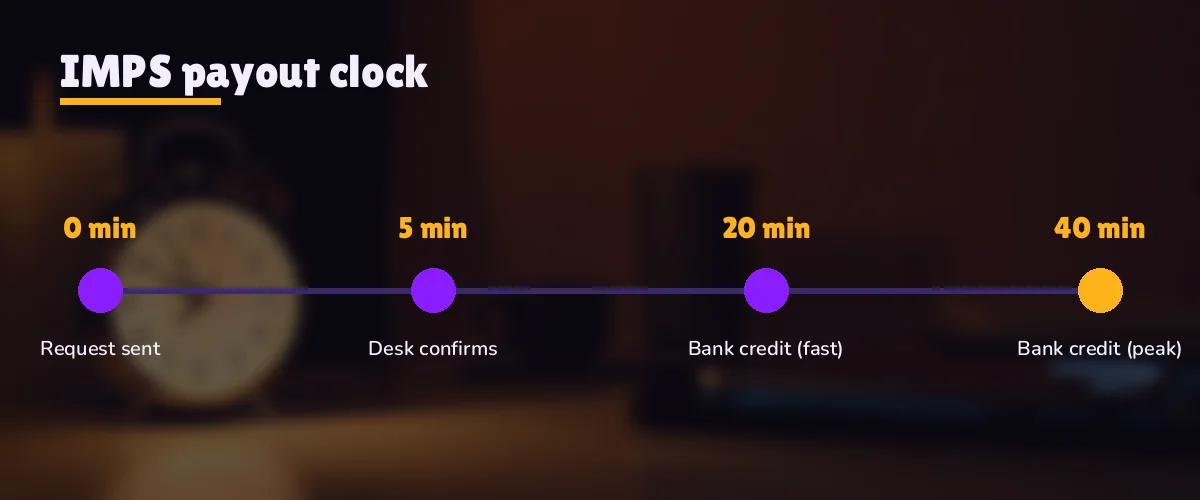
PlayinMatch payout clock: from request to the bank SMS
- 0:00You send the request from the withdrawal screen. ₹1,000 is the floor; anything smaller is refused at the form.
- Desk checkSomeone on the PlayinMatch desk looks at the request: whose name, which bank account, how many payouts already today.
- IMPS outCleared requests leave on IMPS, the bank-to-bank rail that does not wait for working hours.
- 20:00–40:00Credit lands. The SMS or app alert from your own bank is the real finish line, not the PlayinMatch screen.
Inside the 10:00 to 02:00 window, most requests sit somewhere in that 20 to 40 minute band. Outside it, the clock does not start until the desk opens again.
PlayinMatch Withdrawal Time Stop by Stop — the Reliable 20 to 40 Minute IMPS Clock
Forty minutes. That is the outer edge of a normal PlayinMatch withdrawal, and most people who search for the withdrawal time want that one number before anything else. The lower edge is twenty. Where your request lands between the two depends mostly on what the desk sees when it opens it, and a litle on how busy the queue is at that hour.
The request. Signed in, you open the withdrawal screen, type the amount and confirm the bank account you saved earlier. PlayinMatch will not accept less than ₹1,000 here, so a balance of ₹960 simply cannot be withdrawn yet. Once you confirm, the request joins the queue with a timestamp. Note the time on your phone; if you ever need to chase it, that minute is the first thing the desk will ask for.
The desk check. This is the human part, and its the reason a PlayinMatch payout is not instant the way a UPI deposit feels instant. A person on the desk reads the request and compares three things: the name on the ID against the name on the bank account, the account details against what you saved, and the number of payouts you have already taken that day. If all three are clean there is nothing to discuss and the request moves on.
IMPS out. At the PlayinMatch end, clearing and sending are one motion; there is no second queue after the check. What can add a few minutes is your own bank, because some banks hold an incoming IMPS credit briefly for their own screening. Rare, and nothing the desk can speed up.
Credit in your account. The finish line is your bank's alert. Not the PlayinMatch history tab, not a screenshot from the desk. If the SMS has arrived, the payout is done.
So why a band rather than a single figure? Because the check is done by people and the queue changes through the day. A request sent at 11:15 on a quiet weekday morning will usually come in near the twenty-minute end. One sent during the second innings of a big evening match, when a lot of PlayinMatch users cash out at once, can drift toward forty. Neither is a fault.
Past forty minutes is different. That is the point where something has probably stopped the request at the desk check (the problem checklist further down covers the usual reasons), and it is worth acting on rather than waiting. One more practical note: keep the PlayinMatch withdrawal screen open long enough to see the request recorded before you close the app. A request that never reached the queue cannot be timed at all.
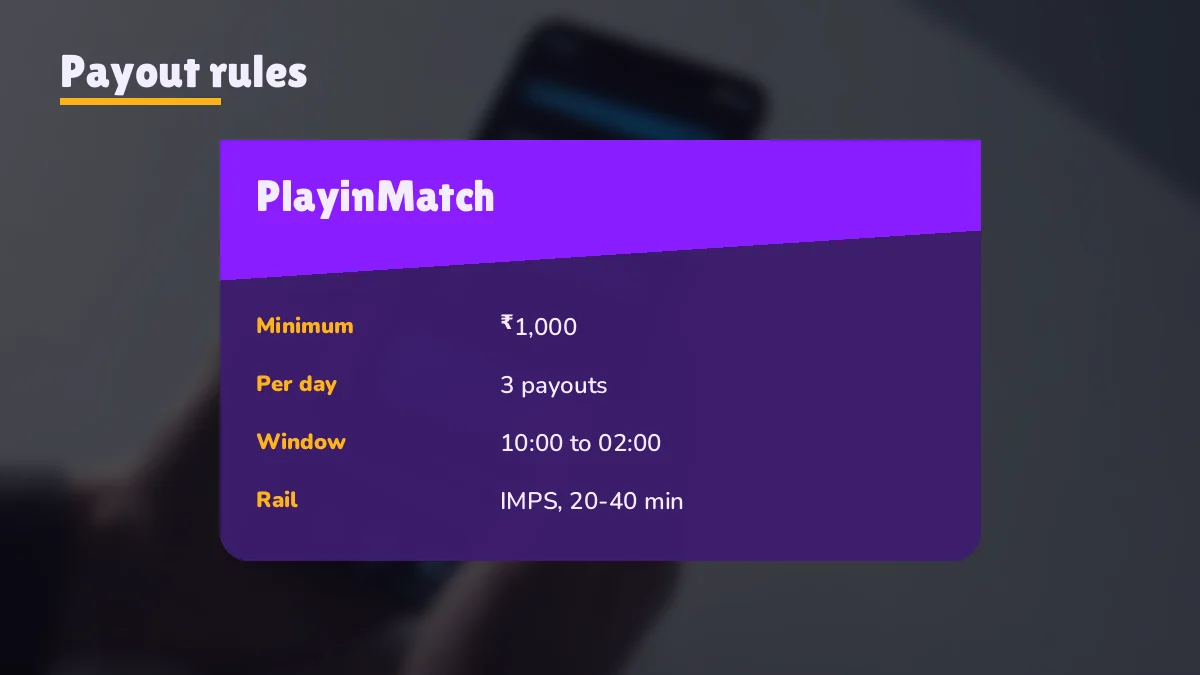
PlayinMatch Withdrawal Limits — Clear ₹1,000 Minimum and 3 Payouts a Day
Two limits shape every PlayinMatch payout, and both are easy to plan around once you know them.
| Rule | What it means for you |
|---|---|
| Smallest payout | ₹1,000 per request |
| Payouts per day | 3 |
| Method | IMPS to a bank account in your name |
| Usual arrival | 20–40 min after the request |
| Desk window | 10:00 to 02:00 |
| Extra identity check | Only on payouts above ₹1,00,000 |
The minimum first. A request for ₹1,000 goes through; ₹999 does not, and the form will tell you so before anything reaches the desk. If your PlayinMatch balance is below that line you have two choices: keep playing until it is above, or leave the balance where it is. There is no small-payout route around it.
Three a day is the other one, and it catches more people than the minimum does. Picture a Saturday with three separate wins. Someone who withdraws ₹1,000 after each of them has used the whole day's allowance by evening, and if a bigger win comes at 22:00 it has to wait for the next day's count. Someone else waits, then takes one ₹3,000 payout. Same money, one slot used, two still free.
A small worked example. Balance ₹4,250 at 14:00. You request ₹4,000, keep ₹250 to play with, and the bank SMS arrives around 14:30. That is one payout of three. If the ₹250 later grows to ₹1,300, a second request is possible that same day; if it only reaches ₹900, it cannot be withdrawn until it clears ₹1,000.
Large amounts follow the same clock up to ₹1,00,000. Above that, PlayinMatch adds an identity step first, which is covered in its own section below. In practice very few payouts reach that size.
PlayinMatch Withdrawal Problem Checklist — Quick Fixes Before You Message Anyone
Most "my payout is stuck" messages trace back to one of a short list of causes. Run through them in this order. It takes two minutes and, more often than not, answers the question before you have typed a word to anyone.
1. What does the clock say? Subtract the request time from now. Twenty-five minutes on a PlayinMatch withdrawal is mid-band; thirty-nine is still inside it.
2. Was the request sent inside 10:00 to 02:00? A request at 03:00 is not late. It is waiting for the desk, which opens at 10:00.
3. Is this your fourth request today? The fourth one does not move until the next day's count begins.
4. Do the names match? A brother's or a friend's account will be held at the desk check. The next section explains why.
5. Is the account number or IFSC right? One wrong digit and the IMPS transfer can bounce back. Open the saved bank details and read them slowly.
6. Is it above ₹1,00,000? Then the PlayinMatch identity check comes first, and the clock starts after it.
7. Can you even get in? Three wrong passwords lock the account for 15 minutes; the PlayinMatch login page has the unlock steps.
If every answer is clean and the forty minutes have passed, look at your bank first. Open the statement in the banking app rather than relying on SMS alerts, since alerts get delayed or filtered on some phones. A credit that arrived without an alert is still a credit.
Still nothing? Then it is a genuine PlayinMatch withdrawal problem and it belongs with the desk, with the details listed in the next section ready to paste. Do not raise a second request for the same money while the first one is still open. Two requests for one balance make the trail harder to follow, and the second one uses up another of your three daily slots for no gain.
PlayinMatch Withdrawal Complaint — the Official 24x7 Desk, Not Telegram Groups
A late payout has exactly one fix-it address at PlayinMatch, and it is the same WhatsApp chat that handed you the ID. Replies typically come within a couple of minutes at any hour; the number is on the PlayinMatch customer care page. That chat sees your request, its timestamp and the reason it is held. A stranger on social media sees none of it.
Send everything in a single message. It saves a round of questions, and a payout complaint that arrives complete is the one that gets sorted first.
- Your PlayinMatch username
- The amount you requested
- The request time, to the minute if you have it
- The last four digits of the bank account it should reach
- A screenshot of the request in your history, if the app shows one
Crop the screenshot to the request line before sending it. The amount and the time are useful; an OTP SMS sitting in the notification bar at the top of the screen is not, so cut it out.
Telegram deserves its own paragraph. Type PlayinMatch withdrawal problem into Telegram search on a slow night and several channels turn up, each with an "agent" offering to release a held payout for a fee, or asking for your username and password to "check from inside". None of them sits at the PlayinMatch desk. The three things the desk check looks at (your name, your bank account, your count for the day) cannot be changed from a Telegram chat, so paying one of them leaves the request exactly where it was. Handing over the password is worse: someone else is now signed in to your wallet.
So the rule is short. Payout complaints go to the PlayinMatch desk, never to a Telegram fixer. If you find a group using the PlayinMatch name to sell "fast payouts", report it to Telegram and tell the desk about it too.
And if the desk confirms the IMPS left their side but your bank shows nothing? Then the trail continues at your bank. Ask the desk for the IMPS reference number and give it to your bank's support line; that reference is what the bank uses to find the transfer.
PlayinMatch Bank Name Mismatch — Safe Payouts Only to Your Own Account
The single most common reason a clean-looking PlayinMatch request stops at the desk is a name that does not match. The ID is in one name; the bank account belongs to someone else. A parent, a spouse, a flatmate who lent their account "just this once".
The desk check will hold it. Every time. That is the point of the check: the person who owns the PlayinMatch balance is the person who receives it, and a payout to a third party is exactly what someone who has stolen a login would try to arrange. So a mismatch is treated as a question to be answered, not a typo to be waved through.
Add a bank account in your own name to the PlayinMatch profile.
Tell the desk the held request should go to that account instead, quoting the request time.
Wait for the desk to confirm. The 20 to 40 minute clock runs again from there.
Small spelling differences are a separate case. "Mohd" against "Mohammed", or a missing middle name, usually gets a quick question from the desk rather than a hold. Joint accounts are harder to call in advance; if yours is one, ask before the first payout rather than after.
PlayinMatch Night and Weekend Withdrawal Time — Live Desk Hours 10:00 to 02:00
The PlayinMatch payout desk clears requests between 10:00 and 02:00. Chat stays open the whole night, but clearing payouts is tied to that window, and that one detail explains most of the "why is it taking eight hours" messages.
Here is what it looks like on a real night. A Test session ends, you win, and you request ₹2,500 at 01:40. That request is inside the window, so it should land by about 02:20 at the latest. Your friend wins on the same match, gets distracted, and requests at 02:10. His goes nowhere until 10:00, then takes its 20 to 40 minutes from there. Same match, same amount; roughly eight hours apart.
Late finish? Send the PlayinMatch request before 02:00 if you want it the same night. After that, the morning is the earliest it will move.
Weekends are less of an issue than people expect. IMPS works on Saturdays, Sundays and bank holidays, and the desk window is the same seven days a week, so a Sunday afternoon request behaves like a Tuesday afternoon one. The thing that does change on weekends is the queue. A Sunday with an IPL double-header tends to bring a wave of PlayinMatch withdrawals after the second match, and the band leans toward its forty-minute end.
Festival evenings work the same way. Not slower because of the date, just busier because of the crowd.
PlayinMatch KYC Above ₹1,00,000 — Verified Check Only on Large Payouts
Below ₹1,00,000, PlayinMatch does not ask for documents before a payout. Above it, there is an identity check first, and the IMPS clock starts once that is finished. The full picture of what the check involves and why it exists sits on the is PlayinMatch safe page, so it is not repeated here.
What matters for timing is simple enough. The check adds time, and how much mostly depends on how quickly you answer the desk. Someone who has the requested documents to hand will be through it far sooner than someone who has to dig them out over a weekend. If you know a large payout is coming, say after a long tournament run, it is reasonable to ask the PlayinMatch desk ahead of time what they will want, so the request itself does not sit waiting on you.
Everything else stays the same: one of your three slots, IMPS, your own account.
PlayinMatch Deposit vs Withdrawal Timing — Fast UPI In, Steady IMPS Out
People notice the gap straight away. A ₹500 UPI top-up shows in the PlayinMatch wallet in two or three minutes (details on the PlayinMatch online deposit page), yet a payout takes twenty to forty. Same account, so why the difference?
Because money coming in needs no decision. A deposit is matched to your ID and credited, and nothing about it can hurt anyone. Money going out does need one, which is the desk check, and a person reading a request takes longer then a machine matching a UTR. The wait buys something: a payout cannot quietly go to an account that is not yours.
| Point | Deposit | Withdrawal |
|---|---|---|
| Smallest amount | ₹500 | ₹1,000 |
| Rail | UPI | IMPS |
| Usual time | 2–3 min | 20–40 min |
| Human check | No | Yes, every request |
| Daily count | Not the limit that bites | 3 payouts |
One more thing about exchange winnings. On the PlayinMatch exchange, commission is taken from net winnings on a market before the balance settles, so the amount you can withdraw is the post-commission figure; the rate is on the PlayinMatch exchange page. Request what the balance actually shows, not what you worked out in your head mid-match.
And keep the deposit habit separate from the payout habit. Topping up and withdrawing on the same hour, back and forth, burns through the three daily slots for no reason at all.
PlayinMatch Withdrawal Searches — Quick Links to the Right Official Page
- PlayinMatch customer care number
- PlayinMatch withdrawal complaint desk
- PlayinMatch paisa kab aayega
- PlayinMatch WhatsApp number
- Is PlayinMatch safe
- PlayinMatch KYC limit
- PlayinMatch online deposit
- PlayinMatch login
- PlayinMatch com mobile login
- PlayinMatch exchange commission
- Join PlayinMatch
- PlayinMatch app download
PlayinMatch Withdrawal Time in India — Fast Payout Facts Folded by Question
Clocking the PlayinMatch withdrawal time in India on a weekday or a Sunday
Clock it yourself: request at 18:05, bank alert by roughly 18:45. That band holds for PlayinMatch withdrawal time in India on any day of the week, Sunday included, because IMPS does not close. The only clock that does close belongs to the PlayinMatch desk, which stops clearing at 02:00 and picks up again at 10:00.
Where a PlayinMatch withdrawal problem usually starts, by this page's checklist
Sorted roughly by how often the PlayinMatch desk meets them, the causes behind a withdrawal problem look like this:
- a bank account in someone else's name
- a fourth request on the same day
- a wrong account number or IFSC
- a payout above ₹1,00,000 waiting for the identity check
- a request sent after 02:00
Which PlayinMatch withdrawal complaint route the desk actually answers
The PlayinMatch withdrawal complaint route is one chat: the WhatsApp desk linked to your ID, open day and night. Telegram groups that claim they can push a payout through sit outside that chat and outside the queue, so a PlayinMatch withdrawal problem taken to Telegram stays unsolved and often costs a fee on top.
PlayinMatch Withdrawal Questions — Clear Answers on Time, Limits and Complaints
How long does a PlayinMatch withdrawal take to reach my bank?
Count on 20 to 40 minutes for a PlayinMatch withdrawal by IMPS, measured from the moment the request goes in between 10:00 and 02:00. A quiet weekday morning tends to finish nearer the twenty-minute mark; a packed match night, with payouts queued behind each other, pushes the same request toward forty.
What is the minimum amount I can withdraw from PlayinMatch?
You can withdraw a minimum of ₹1,000 from PlayinMatch. Any figure from four digits upward can be requested in one go, and the request screen checks it before it reaches the desk. A balance of, say, ₹740 stays playable in the wallet but cannot be cashed out yet.
How many times a day can I withdraw on PlayinMatch?
You can take three PlayinMatch payouts a day. A fourth request waits for the next day's count to begin. Because of that cap, one larger withdrawal after several wins usually works better than three small ones taken through the evening, which leaves no slot for a late win.
Why is my PlayinMatch withdrawal still showing pending?
A PlayinMatch withdrawal stays pending when it is still inside the 40-minute band or when the desk check has held it. Common holds are a bank account in another name, a wrong IFSC, a fourth request, a request after 02:00, or an amount above ₹1,00,000 waiting for identity checks.
Can PlayinMatch pay into a bank account in someone else's name?
No, PlayinMatch payouts go only to a bank account in the same name as the ID. A request to a relative's or friend's account is held at the desk check. Add an account in your own name to the profile, then ask the desk to send the held request there.
Does PlayinMatch process withdrawals at night?
Yes, until 02:00. The PlayinMatch payout desk clears requests from 10:00 to 02:00, so a request at 01:40 should arrive the same night. One sent at 02:10 waits until the desk reopens at 10:00 and then takes the usual 20 to 40 minutes.
Where should I complain about a late PlayinMatch withdrawal?
Complain to the PlayinMatch WhatsApp desk, which runs 24x7 and can see your request. Send your username, amount, request time and the last four digits of your bank account. Do not pay Telegram groups that promise to release payouts, and never share your password or OTP with anyone.