
- PlayinMatch99
- PlayinMatch App Download
PlayinMatch App Download — Verified Build Stamp on a 22 MB Android File
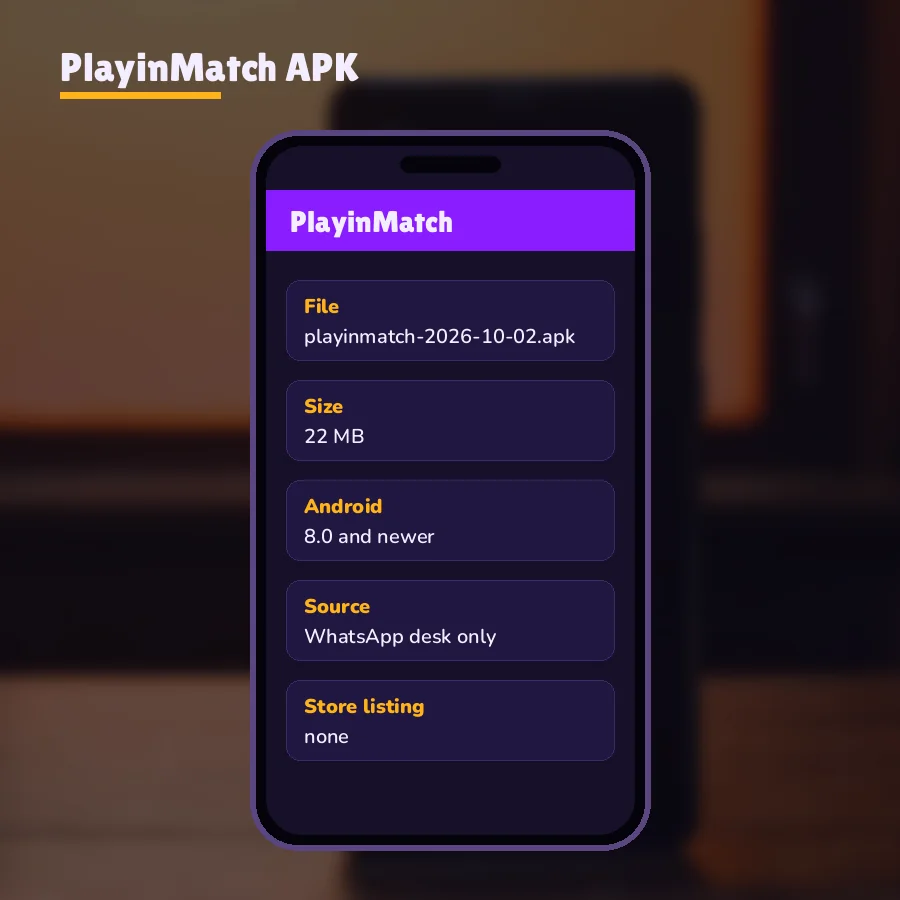
PlayinMatch app download has one source: the 24x7 WhatsApp desk sends a single Android package of about 22 MB, with the build date written into the file name. Phones on Android 8 or newer install it. There is no Play Store listing, so any other button you find is a guess.
How the PlayinMatch App Download Arrives — Verified File From the 24x7 Desk
Type the keyword into Google and the first page fills with download buttons on sites we have nothing to do with. The PlayinMatch file is not behind any of them. It travels by hand, as a document inside a WhatsApp chat, from the same desk that issues IDs (that part takes roughly 5 minutes and lives on the join PlayinMatch page). Asking for the APK happens in the same thread, usually straight after the username and password arrive.
Five moves, start to finish:
Open the PlayinMatch desk chat and say you want the Android app. Put your Android version in the same message. If your phone is on 7 or lower, the desk will tell you up front, and you skip a wasted download.
What comes back is a document, not a link. WhatsApp prints the file name and the size on the bubble before you tap anything. You are looking for roughly 22 MB and a date inside the name.
Tap the bubble to download. On a decent 4G signal that is usually under a minute; on weak café Wi-Fi it can crawl. Your PlayinMatch file goes to WhatsApp's documents folder, not your photo gallery, which confuses people more than anything else on this list.
Back in the chat, tap the finished bubble. First time only, Android pauses on a toggle named Install unknown apps, and it is tied to WhatsApp alone rather than the whole phone. Flip it on, press back, and the PlayinMatch installer opens. Turning that toggle off later changes nothing for the installed app.
Open PlayinMatch and sign in with the ID you already hold. Same username, same password, same balance as the browser. Nothing moves to the phone except a shortcut to your account.
That is the whole route, and on a normal day it takes less time than making tea, which is roughly the point of sending a file instead of a link that can break or be blocked. If the file in your chat has no date, or comes in at 3 MB, stop at move two and ask again. The detailed tap-by-tap screens for the installer itself are on the PlayinMatch install page; this page stays with the file.
PlayinMatch APK build stamp table — the latest dated file against copies that float around
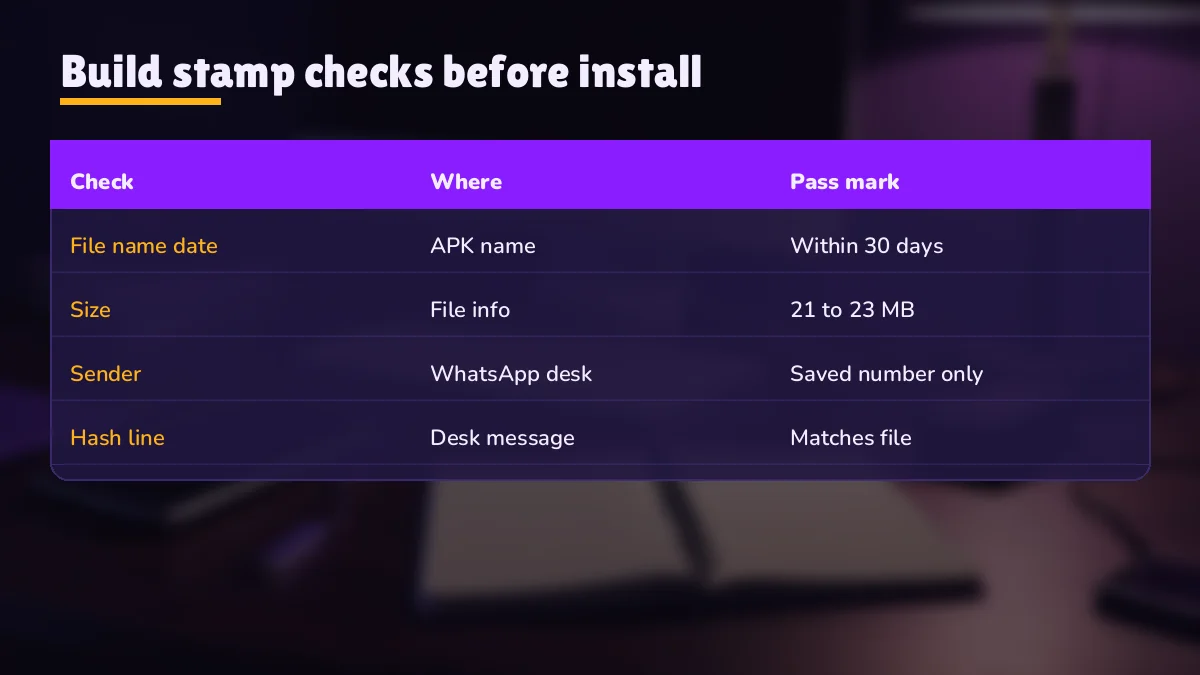
Every PlayinMatch package the desk sends carries its build date in the file name. That stamp is the quickest way to sort a real file from a stale or fake one, and it is why we put it in the title of this page. Read across each row and match it to what sits in your downloads.
| Build date in file name | Size | Android min | Notes |
|---|---|---|---|
| Latest date, sent in your chat today | about 22 MB | Android 8 | Install this one. It is the single package the desk hands out. |
| Older date, saved weeks or months back | about 22 MB | Android 8 | May still open. Ask for the latest before you rely on it; the date tells you how far behind it is. |
| No date anywhere in the name | any | unknown | Not a desk file. Delete it. |
| Date present, size 2-5 MB | far under 22 MB | unknown | Broken download or a launcher that points elsewhere. Re-download from chat. |
| Store app called PlayinMatch | n/a | n/a | The desk never publishes PlayinMatch on Google Play. Any listing is a lookalike. |
| .apk.zip, .xapk or .bin ending | varies | varies | Renamed or repackaged. Ask for a fresh .apk. |
PlayinMatch update routine — a quick install over the top when a newer stamp lands
A newer stamp goes on top of the old one; no uninstall, no fresh sign-up. Ask the desk whether a newer PlayinMatch build is out, compare its date with the one on your phone, and if the chat file is newer, tap it and choose Update when Android offers. Your sign-in stays put in most cases. If it does not, type the same username and password again; the account itself was never on the phone.
How often? Hard to say, because builds do not follow a calendar we can promise. A sensible habit is to ask whenever something in the app starts behaving oddly, or before a long tournament weekend when you would rather not discover a stale file at the toss. Eleven seconds of typing in the chat. Then you know.
Only the first row is a file to install. Rows two to six are what turns up when people forward a copy to a friend, or pick one up from a Telegram group a year ago.
Why bother with a date at all? Because the PlayinMatch file looks identical from the outside every time. Same icon, roughly the same size. Without the stamp, nobody (the desk included) could tell from a screenshot whether your copy is current. With it, one glance at the name settles the question and support can say "that one is old, here is the new build" in a single line.
PlayinMatch Download APK Checks — Safe Tests Before the Install Prompt
Sixty seconds of looking at the chat bubble saves most of the trouble in the next sections. Each check below uses a number or a detail that belongs to the PlayinMatch file specifically, so a lookalike usually fails at least one of them.
Who sent it. The PlayinMatch file should come from the desk chat where your ID was issued. A forward from a friend is a copy of a copy, and you cannot see its history.
The size. About 22 MB, shown on the WhatsApp bubble. A few hundred KB either way is fine. A 4 MB file or a 90 MB file is not ours.
The stamp. A date in the name, and it should be the latest the desk has sent. Older is not dangerous by itself, just behind.
The ending. The name should end in .apk and nothing else. If your file manager shows .apk.zip, something renamed it on the way.
The permissions. PlayinMatch asks for storage and nothing unusual beyond it; the is PlayinMatch safe page lists exactly what the app touches and what it never asks for.
If all five line up, go ahead and install. If one fails, do not try to reason your way past it. Ask the desk for a fresh copy instead; resending takes them seconds and saves you a messy uninstall later.
One more thing people skip: after install, open the app drawer and look at the icon name. It should read PlayinMatch. A launcher that installed under a different name, or that immediately asks for accessibility access, is not the file this page talks about, and it should come off the phone the same day.
PlayinMatch APK Old Version — Clear Answer on Stale Stamps and Android 7 Phones
People type "old version" into the search box for a handful of reasons, and each one has a different fix, so it pays to pull them apart. Some have an older phone and assume an older PlayinMatch file will suit it. Some installed the new build, hit an error, and want to roll back. A few just preferred how things looked before. And a fair number were handed an old file by someone and want to know if it still works.
Short answer for all of them: the desk sends one package, the latest dated build, and nothing older is kept on offer. There is no separate build for Android 7 or below. The floor is Android 8, full stop.
PlayinMatch on an older phone — the fast browser fallback for Android 7
If your phone runs Android 7 or older, an earlier PlayinMatch APK will not rescue it. Use the mobile browser instead. You open the PlayinMatch address, sign in with the same username and password, and add a shortcut to the home screen; the PlayinMatch com mobile page covers that route, including what to do when an address is blocked. It is the same account, same balance, so the phone age stops mattering. Plenty of people end up preferring it, to be fair, because there is is nothing to update.
PlayinMatch stale builds — why an older file fails in real use
An old PlayinMatch build may install fine and still let you down. In practice it tends to fail at the worst moment: sign-in loops, an update prompt that will not go away, or a screen that loads half its content. The exchange side changes over time (markets, login checks, payment screens) and a build from months back was made for what existed then. Exactly which change breaks which build is hard to say from outside. That is the reason the date sits in the name. You do not need to know the cause; you only need to know your stamp is older then the one the desk is sending today.
Rolling back has a catch too. Android refuses to install an older APK over a newer one with the same package name, and it says so with a blunt "App not installed". To go backwards you would have to uninstall first. Nothing is lost by uninstalling, since your PlayinMatch ID and balance live on the account, not on the phone, but you gain nothing either, because the older file just runs into the problems above.
Here is a typical case. Someone saves the PlayinMatch file in March, changes phones in August and sideloads that same saved copy onto the new handset. It installs. It opens. The sign-in screen then spins and drops back to the start, again and again. They search "playinmatch apk old version" assuming a different old build is the cure. What actually fixes it is the opposite: one message to the desk, the latest stamp, install over the top, done in under five minutes.
For a wider look at what the app does once it is running (notifications, the live tabs, how it compares to the browser), the PlayinMatch app overview picks up where this download page stops.
PlayinMatch App Download APK Problems — Fast Fixes Matched to Each Android Error Message
Most PlayinMatch download trouble falls into a short list, and nearly all of it shows up as one of a handful of plain Android messages that look scarier than they are. Find the message you are seeing, try the fix, and only then ask the desk. Each one below is an Android or WhatsApp behaviour, not something unique to our file, which is good news: the fixes are well worn.
Download stuck at 0% in WhatsApp. Usually storage or data saver. Check that the phone has free space a few times bigger than the 22 MB file, turn off data saver for WhatsApp, and tap the bubble again. If the chat shows a circular arrow that never fills, switch between Wi-Fi and mobile data once.
"There was a problem parsing the package". Two common causes. First suspect is Android below 8: the PlayinMatch file simply cannot install there, and the browser route above is the answer. Or the download stopped partway. Delete the file, download it fresh from the chat and confirm the bubble reads about 22 MB before tapping.
"App not installed". Nearly always a clash with something already on the phone: an older or newer PlayinMatch copy, or a lookalike from another source using the same name. Uninstall the existing one, then install the desk file. Your account is untouched by this.
Scanner pop-up mid-install. On plenty of phones a Google scan runs the instant the installer opens and throws up a caution screen. Hold your file against the stamp table near the top. First row? Then the caution is only about where the PlayinMatch file came from, and the expanded options let you carry on. Any other row, cancel and message the desk.
Install tap does nothing. A floating overlay is the usual culprit: a chat head, a night-light filter, a screen recorder. Android quietly refuses permission taps while something sits on top of the screen. Pause the overlay, reopen the PlayinMatch file from chat, tap again.
File missing from Downloads. Not lost, just parked where WhatsApp keeps its own media, several folders deep on newer Android releases. Skip the hunt: scroll the PlayinMatch desk thread up to the dated bubble and open it right there.
File downloaded on a laptop or a second phone. It works, but it adds a step where things go wrong. Moving the PlayinMatch APK by USB cable, Bluetooth or Nearby Share sometimes renames it or cuts it short, and then you are back at the parse error in B. If you can, open WhatsApp on the phone that will actually run the app and download it their directly; that keeps the size and the date stamp exactly as the desk sent them.
A different kind of block shows up after install, not during it. Betting domains get blocked by Indian internet providers from time to time, and when the address behind an app or a browser tab is hit, pages stop loading. Your ID is not the problem. The account works the same on every mirror address, same ID and same balance, and the desk can tell you whether a newer PlayinMatch build is already out for the moment. If the error is a sign-in failure instead, the PlayinMatch login page explains the lockout timer and OTP step.
Still stuck? Send the desk a screenshot of the exact message plus your Android version. Two details, one message. Usually enough for them to point at the cause without a back-and-forth.
PlayinMatch on iPhone — Free Browser Route Instead of an APK Download
Message the desk from an iPhone asking for the 22 MB file and you will be steered elsewhere. Everything earlier on this page (the date stamp, the size check, the Android 8 floor) describes a package that iOS has no way to run, and PlayinMatch keeps no App Store entry, so an iOS "version" offered on some forum is a fake by definition.
iPhone users get the same account a different way. Open Safari, go to the PlayinMatch mobile address, sign in, then use Share and Add to Home Screen. That icon behaves like an app, nothing installs, and there is never a build to update. Same ID, same balance as Android. The PlayinMatch mobile web route has the current address and the add-to-home steps, and if you want live match tabs specifically, the PlayinMatch live app page explains what those screens show on either phone.
Short version for mixed households: Android phones get the 22 MB file, iPhones get the browser. Both log in to one PlayinMatch ID.
PlayinMatch Download Searches — Top Related Pages on This Site
PlayinMatch App Download Ledger — Verified Size, Floor and Date Stamp
Where the PlayinMatch app download comes from on this site's route
Every PlayinMatch app download starts in the WhatsApp desk chat. The PlayinMatch app download apk is one Android package, so a search for PlayinMatch apk, PlayinMatch download or PlayinMatch download apk ends at the same file: about 22 MB, Android 8 or newer, the build date printed in its name.
- Ask the desk for the PlayinMatch file and state your Android version.
- Check the bubble for roughly 22 MB and a dated name ending in .apk.
- Allow WhatsApp to install unknown apps for this one install.
- Sign in with your existing ID; the balance is already there.
What the PlayinMatch apk old version question comes down to
Only the latest dated PlayinMatch build is sent. A PlayinMatch apk old version will not open on Android 7, and Android blocks installing an older file over a newer one, so the fix for an aging copy is the newest stamp, or the browser on older phones and iPhones.
| File size | about 22 MB |
|---|---|
| Android floor | Android 8 or newer |
| Source | WhatsApp desk chat, 24x7 |
| Play Store | not listed |
| File name | carries the build date |
| iPhone | browser and home-screen icon, no APK |
PlayinMatch App Download Questions — Clear Answers on the APK
Where can I download the PlayinMatch APK?
From the PlayinMatch WhatsApp desk, inside your own chat. The desk sends the Android file as a document of about 22 MB with the build date in its name. Download buttons on other websites are not the desk file, so skip them and ask in the chat instead, at any hour.
Is the PlayinMatch app on the Play Store?
No, and that is deliberate. The only Android route is the dated APK the desk sends in your WhatsApp chat, so a Google Play result using the PlayinMatch name is a lookalike. On an iPhone, sign in through Safari instead; it is the same ID and the same balance.
How big is the PlayinMatch APK file?
About 22 MB. WhatsApp shows the size on the document bubble before you download, so you can check it first. A file far smaller than that is usually a broken download or a launcher pointing somewhere else, so ask the desk to resend the dated package.
Will an old PlayinMatch APK version still log in?
Sometimes, but do not count on it. An older build may install and then fail at sign-in or keep asking for an update, because the exchange side changes over time. Compare the date in your file name with the latest one the desk sends, and install the newer file.
How do I fix a parse error on the PlayinMatch APK?
Check the Android version first: the file needs Android 8 or newer, and older phones show a parse error. If the version is fine, the download was probably cut short. Delete the file, download it again from the chat and confirm the bubble shows roughly 22 MB.
Is the PlayinMatch app download safe?
The desk file is the one to trust: a dated name, about 22 MB, sent in your own chat. It asks for storage access and nothing unusual beyond that. Copies from Telegram groups or random sites have no known history, so delete those and request a fresh file from the desk.
Which Android version does PlayinMatch need?
Android 8 or newer. Open Settings, then About phone, and read the Android version line before you ask for the file. Phones on Android 7 or below cannot install the APK, but they can still use PlayinMatch in the mobile browser with the same username and password.